NetSuite vs Dynamics 365 Business Central: The 2026 Mid-Market Comparison
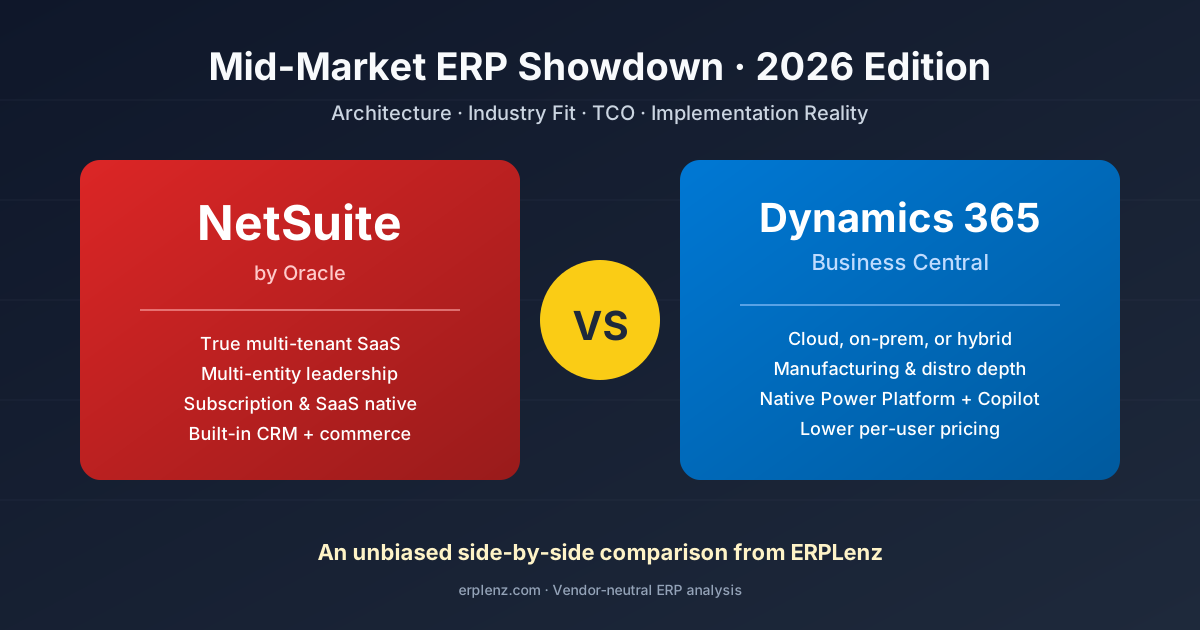
Quick answer: Choose NetSuite if you're a multi-entity, services, SaaS, or e-commerce business that needs OneWorld-grade consolidation, ASC 606 revenue recognition, and a fully managed single-vendor cloud. Choose Microsoft Dynamics 365 Business Central if you're a Microsoft-centric manufacturer, distributor, or project-based business that values per-user pricing, deep Power Platform and Power BI integration, and the option to deploy on-premises or hybrid. NetSuite wins on multi-entity and audit-readiness; Business Central wins on TCO, manufacturing, and Microsoft ecosystem fit.
NetSuite and Microsoft Dynamics 365 Business Central dominate mid-market ERP shortlists across North America, the UK, the EU, Australia, and increasingly the GCC. Both are cloud-native. Both scale to several hundred users. Both promise seamless finance, operations, and CRM alignment.
But "best" is a myth. The right choice depends entirely on your industry, internal IT capacity, regional footprint, and operational priorities.
This comparison strips away vendor marketing and focuses on architectural reality, implementation timelines, hidden costs, and where each platform genuinely shines. We've pulled from over 200 implementation post-mortems, vendor pricing data current to 2026, and research from Panorama Consulting, Gartner Peer Insights, and ISG to deliver the most honest comparison you'll find online.
Quick-Glance Comparison Table
| Dimension | NetSuite (Oracle) | Dynamics 365 Business Central |
|---|---|---|
| Deployment model | Public cloud, true multi-tenant SaaS | Cloud-first SaaS + on-premises option |
| Best fit | Services, SaaS, e-commerce, multi-subsidiary | Manufacturing, distribution, project-based, Microsoft-centric |
| Starting price (per user/mo) | ~$99 + $999 base platform fee | $70 Essentials / $100 Premium |
| Implementation time | 4–9 months typical | 3–6 months typical |
| Implementation cost | $75K–$500K+ | $50K–$300K+ |
| Customisation | SuiteScript (JavaScript) | AL language + Power Platform |
| Reporting | SuiteAnalytics + saved searches | Native + Power BI + Microsoft Fabric |
| CRM | Built-in | Separate Dynamics 365 Sales licence |
| Manufacturing depth | Light to moderate | Strong, especially with ISV add-ons |
| Multi-entity / multi-currency | Native — industry-leading | Strong; complex setups may need extensions |
| Marketplace | SuiteApp.com (~600 apps) | AppSource (3,500+ apps) |
| Annual updates | 2 mandatory upgrades/year | 2 major + monthly minor releases |
| Regional availability | Global, strongest in US/EMEA | Global, strongest in US/UK/EU/AU/NZ |
| Renewal posture | Notoriously firm; 8–15% annual uplift | More flexible; transparent per-user model |
Architecture & Platform Foundations: Why This Matters More Than You Think
The most underestimated decision factor in any ERP evaluation is platform architecture. It determines how the system upgrades, customises, integrates, and ultimately constrains your business five years from now. For the broader frame, see cloud vs on-premises ERP.
NetSuite: True Multi-Tenant SaaS, One Codebase to Rule Them All
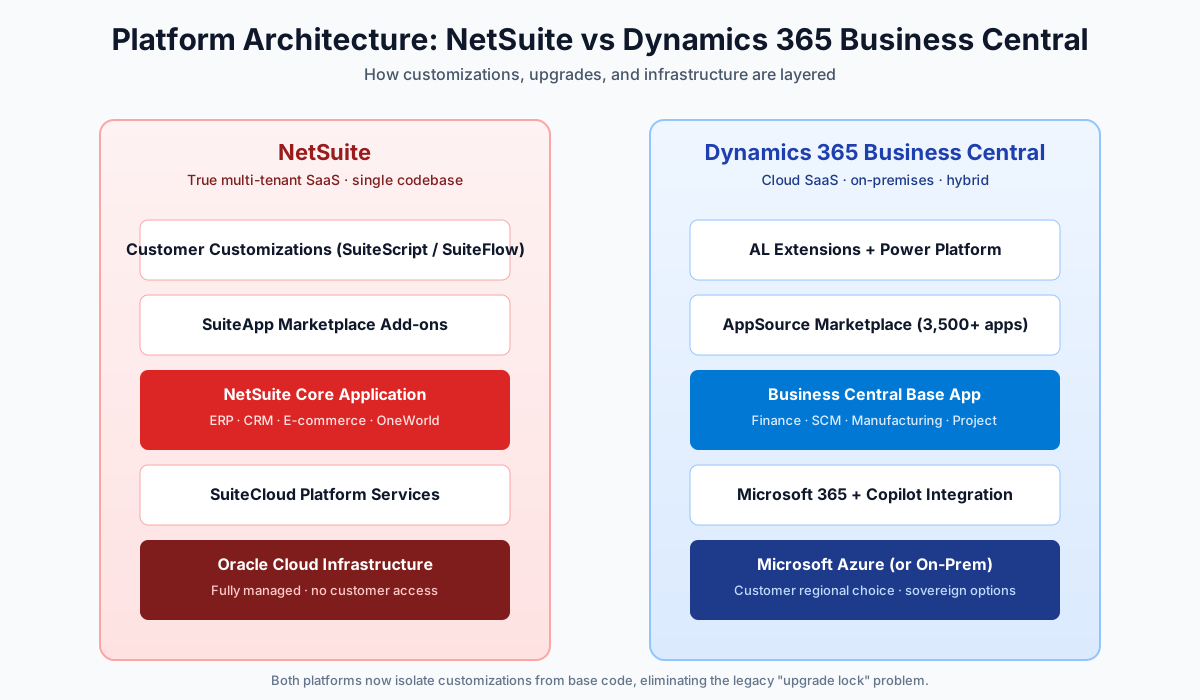
NetSuite was built as a SaaS application from the start (1998, before "SaaS" was a term). Every customer runs on the same version of the codebase, hosted in Oracle's data centres. Customisations happen in a sandbox layer that sits above the core code, never touching it.
What this means in practice:
- Upgrades are automatic and non-negotiable — twice a year (typically March and August), every NetSuite customer is upgraded simultaneously. You cannot defer.
- Customisation risk is contained. SuiteScript and SuiteFlow live in a sandbox; upgrades rarely break custom code.
- Performance is shared. Quarter-end close periods can feel slower because every tenant is closing at once.
- You don't manage infrastructure. Ever. There's no on-premises, no private cloud, no hybrid.
Dynamics 365 Business Central: The Hybrid Reality
Business Central evolved from Microsoft Dynamics NAV (formerly Navision), a 1980s on-premises product. Microsoft has spent the last seven years rearchitecting it for the cloud, but the DNA remains — both a strength and a weakness.
What this means in practice:
- You can deploy in the cloud OR on-premises. Useful for regulated industries (defence, certain healthcare, GCC sovereign cloud) where data residency is mandated.
- Customisation uses AL (Application Language), a modern Microsoft language with a robust Visual Studio Code IDE.
- The Extensions architecture (since 2018) isolates custom code from the base, similar to NetSuite's approach. This was a major improvement over the legacy C/AL modifications that haunted NAV upgrades.
- Microsoft Azure provides excellent uptime, global region availability, and sovereign cloud options in the UK, EU, US Gov, and GCC.
- Power Platform integration is native — Power BI, Power Automate, Power Apps, Copilot Studio all plug in without middleware.
The Honest Verdict on Architecture
If you want a single system that everyone in the world is running the same version of, with zero infrastructure decisions, NetSuite wins. If you want flexibility — keeping some workloads on-premises, running hybrid, or deploying in a sovereign region — Business Central wins.
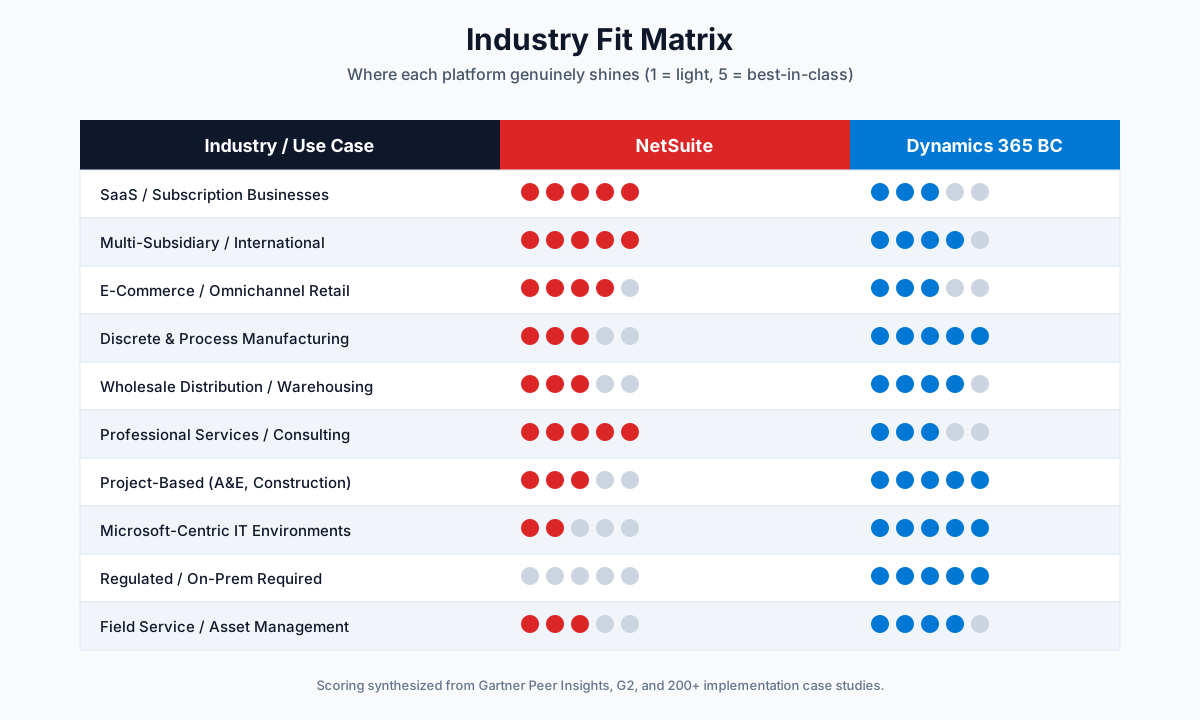
Industry Fit: Where Each Platform Genuinely Shines
This is where vendor demos get misleading. Both platforms have "industry editions," but the depth varies wildly.
Where NetSuite Wins
| Industry | Why NetSuite |
|---|---|
| Software & SaaS | ASC 606 / IFRS 15 revenue recognition is best-in-class for the mid-market. Native subscription billing, deferred revenue automation, ARR/MRR/churn dashboards. The de facto standard for VC-backed software businesses. |
| Multi-subsidiary organisations | OneWorld is unmatched in the mid-market — native intercompany journals, automated currency translation, multi-book accounting (US GAAP + IFRS + statutory simultaneously), consolidation across hundreds of subsidiaries. |
| E-commerce & retail | SuiteCommerce plus deep Shopify, BigCommerce, and Amazon integrations. Real-time inventory across stores, warehouses, and 3PLs. |
| Professional services firms | SuiteProjects (formerly OpenAir) handles utilisation, project accounting, time tracking, and services revenue recognition. Few mid-market ERPs match this depth. |
| Wholesale distribution (basic) | Solid for distributors with straightforward warehouse operations. Complex WMS needs a third-party (DELMIAworks, HighJump, or a Boomi-integrated WMS). |
Where Dynamics 365 Business Central Wins
| Industry | Why Business Central |
|---|---|
| Discrete & process manufacturing | BC's home turf. BOM management, routings, capacity planning, MRP, shop floor control, quality management. Scales with ISVs like Insight Works, ToIncrease, DELMIAworks integrations, or Pretium. |
| Project-based businesses | Dynamics 365 Project Operations adds project accounting, resource management, time/expense capture, percentage-of-completion accounting. Stronger than NetSuite for engineering, construction, and A&E. |
| Microsoft-centric environments | If your team lives in Outlook, Teams, SharePoint, and Excel, friction is near-zero. Two-way Excel sync, embedded Outlook integration converting emails into sales orders — these save real hours per user per week. |
| Distribution with heavy warehousing | Premium tier includes directed pick-and-put-away, license plate tracking, multi-bin management out-of-the-box. NetSuite typically needs WMS add-ons to match. |
| Highly regulated / sovereignty-sensitive industries | Defence contractors, government suppliers, certain healthcare and GCC-regulated organisations needing on-premises or sovereign cloud have no equivalent option in NetSuite. |
Implementation Reality: What Vendors Won't Tell You
Both platforms publish marketing about "rapid deployment." Mid-market ERP implementations consistently take longer and cost more than the initial estimate. Here's the unvarnished truth — and for a deeper view, see how long ERP implementation actually takes.
Typical Implementation Timeline
| Phase | NetSuite | Business Central |
|---|---|---|
| Discovery & design | 4–8 weeks | 4–8 weeks |
| Configuration & customisation | 8–16 weeks | 6–12 weeks |
| Data migration | 4–8 weeks | 4–8 weeks |
| Testing & UAT | 4–6 weeks | 4–6 weeks |
| Training & go-live | 4–6 weeks | 3–5 weeks |
| Total realistic range | 4–9 months | 3–6 months |
Why Business Central is typically faster:
- Smaller default scope (no native CRM, narrower modules out of the box).
- Mature partner ecosystem with industry templates.
- Familiar Microsoft UI reduces training time materially.
- Excel-based data migration is genuinely easier.
Why NetSuite takes longer:
- More modules to configure out of the box.
- Multi-entity (OneWorld) setups add weeks.
- SuiteScript customisations take longer to develop than AL extensions.
- Stricter testing cycles because of forced upgrades.
The Five Most Common Implementation Failures
- Underestimating data cleansing. Migrating 10 years of dirty customer and vendor records into either system without cleanup creates permanent technical debt. Budget 25–35% of project hours for data work — see the ERP data migration guide.
- Choosing the wrong implementation partner. Both vendors have certified partner networks ranging from world-class to outright dangerous. Always interview the actual consultants on your project — not the sales team. See partner vs vendor-direct.
- Boiling the ocean. Trying to implement every module on day one virtually guarantees failure. Phase your rollout: Finance → Operations → CRM → Advanced. See big bang vs phased vs modular.
- Customising before configuring. Both systems have far more out-of-the-box functionality than most teams realise. Resist recreating old workflows; adapt to ERP best practices. See how much customisation is advisable.
- Inadequate change management. ERP failure is rarely technical. It's almost always human. Plan for executive sponsorship, weekly stakeholder check-ins, and dedicated training time. See why ERP implementations fail.
Partner Ecosystem Quality
NetSuite's partner program (NetSuite Alliance Partners) is more centralised and vetted, but smaller. Tier-1 partners (RSM, Myers-Holum, Big Bang ERP) bring deep experience at premium rates ($200–$300/hour USD).
Microsoft's Business Central partner network is vastly larger (4,000+ partners worldwide), which is a double-edged sword. Quality varies enormously. Look for Microsoft Inner Circle status or Solutions Partner designations as quality signals. In the UK and EU, several partners specialise in MTD and EU VAT compliance respectively; in Australia and India, look for partners with local STP and GST e-invoicing experience.
Total Cost of Ownership: The Five-Year Reality
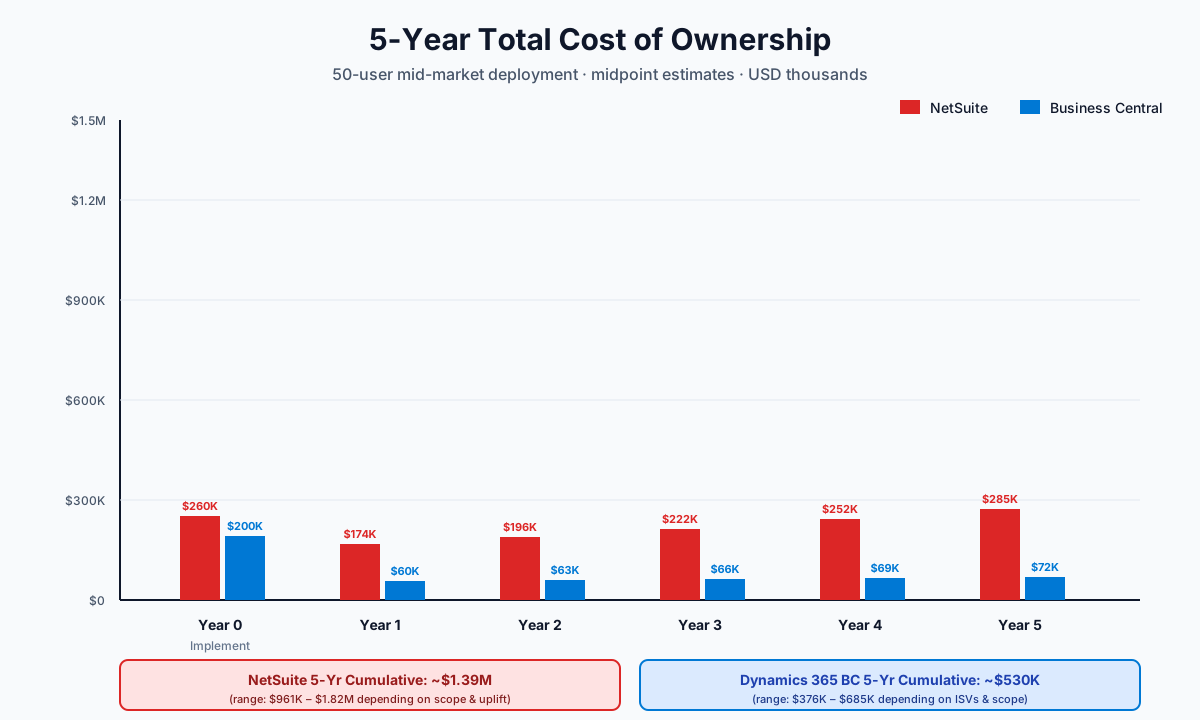
Vendor pricing pages tell you almost nothing about real cost. Here's a realistic five-year TCO model for a 50-user mid-market deployment. For tier-by-tier cost benchmarks across the wider market, see how much ERP really costs.
Licensing Costs (USD)
| Component | NetSuite | Business Central |
|---|---|---|
| Base platform fee | ~$999/month (mandatory) | None |
| Full user | ~$99–$129/month | $70 Essentials / $100 Premium |
| Limited / Team Member | ~$15/month | $8/month |
| Modules (Advanced Inventory, OneWorld, Manufacturing, etc.) | $300–$2,000/month each | Included in tier (Premium adds manufacturing) |
| 50-user typical configuration | $11K–$18K/month | $4K–$6K/month |
| Annual uplift at renewal | 8–15% historically | 0–6% typically |
Implementation Costs (USD, 50-User Mid-Market)
| Cost bucket | NetSuite | Business Central |
|---|---|---|
| Discovery & blueprint | $20K–$40K | $15K–$30K |
| Configuration | $40K–$80K | $30K–$60K |
| Customisation (average) | $30K–$100K | $20K–$80K |
| Data migration | $20K–$50K | $15K–$40K |
| Training | $10K–$25K | $8K–$20K |
| Project management | $15K–$30K | $12K–$25K |
| Contingency (15%) | $20K–$40K | $15K–$30K |
| Total implementation | $155K–$365K | $115K–$285K |
Five-Year TCO Comparison (50-User Mid-Market, USD)
| Year | NetSuite (low/high) | Business Central (low/high) |
|---|---|---|
| Year 0 (implementation) | $155K–$365K | $115K–$285K |
| Year 1 subscription | $132K–$216K | $48K–$72K |
| Year 2 subscription | $145K–$248K | $50K–$76K |
| Year 3 subscription | $160K–$285K | $52K–$80K |
| Year 4 subscription | $176K–$328K | $54K–$84K |
| Year 5 subscription | $193K–$377K | $57K–$88K |
| 5-year total | $961K–$1.82M | $376K–$685K |
Reality check: Business Central is dramatically cheaper on paper for the same user count. The advantage erodes if you need significant ISV add-ons (advanced manufacturing, EDI, advanced WMS), which can add $20K–$100K+ in annual licensing. Build your TCO around the full software stack you'll actually deploy, not the base platform.
Hidden Costs Most Buyers Miss
- Sandbox environments — NetSuite charges per sandbox; BC includes one production + sandbox.
- API call limits — both platforms throttle integrations; high-volume integrators may need premium tiers.
- Storage overages — NetSuite File Cabinet beyond the included quota costs money.
- Premium support — standard support is included on both; 24/7 premium tiers are extra.
- User licence true-ups — both vendors audit; understand your contract's flexibility.
- ISV bolt-ons — Avalara for tax, Celigo or Kantata for integration/PSA, FloQast for close — most mid-market deployments end up with three to seven of these.
Customisation & Extensibility
Both platforms have evolved dramatically over the past five years. The old wisdom that you should never customise NetSuite or NAV is outdated.
NetSuite Customisation
- SuiteScript 2.x uses JavaScript with modern async patterns. Developer talent widely available.
- SuiteFlow — no-code workflow builder for business users.
- SuiteBuilder — custom records, fields, forms without code.
- SuiteAnalytics Workbook — advanced reporting without SQL.
- SuiteCloud Development Framework (SDF) — source control + CI/CD for serious dev teams.
Business Central Customisation
- AL extensions are isolated, upgrade-safe, developed in VS Code.
- Power Platform (Power Apps, Power Automate, Power BI) is a near-magical productivity multiplier for citizen developers.
- Copilot integration is rapidly maturing — natural-language queries and AI-assisted document processing are now production features.
- AppSource has more pre-built extensions than NetSuite's SuiteApp.com (3,500+ vs ~600).
Bottom line: Both platforms now support clean, upgrade-safe customisation. The choice often comes down to your developer talent pool. JavaScript shops lean NetSuite. Microsoft-stack teams lean Business Central easily.
Reporting & Analytics
| Capability | NetSuite | Business Central |
|---|---|---|
| Standard reports | Saved Searches — powerful but dated UI | Solid native reports, modern UI |
| Modern analytics layer | SuiteAnalytics Workbook (learning curve) | Power BI — industry-leading |
| External BI connectivity | SuiteAnalytics Connect (ODBC/JDBC, extra cost) | Native to Microsoft Fabric, Synapse, Azure Data |
| Spreadsheet integration | Export-focused | Two-way Excel refresh, best-in-class |
| Embedded dashboards | Highly configurable per role | Role centres with embedded Power BI |
If reporting and analytics sit in your top-three decision criteria, Business Central wins — primarily because of the Power BI ecosystem and Microsoft Fabric.
Integration Ecosystem
NetSuite's REST and SOAP web services are mature but rate-limited. Most mid-market customers use an iPaaS layer (Celigo, Boomi, Workato) rather than building point-to-point integrations.
Business Central's API surface is RESTful, well-documented, and integrates trivially with Power Automate, Logic Apps, and Azure Functions. For lightweight integrations, you may not need a paid iPaaS at all.
For complex EDI requirements (mandatory for many distributors and manufacturers), both platforms typically rely on third-party EDI providers (SPS Commerce, TrueCommerce, Cleo). For a broader perspective on integration strategy, see ERP integration with existing systems.
Regional Tax, Banking & Compliance
Both platforms operate globally, but with different defaults:
| Region | NetSuite | Business Central |
|---|---|---|
| UK MTD | Via Avalara or Tax Systems | Native HMRC bridge |
| EU VAT (incl. OSS/IOSS) | Native + partner extensions | Native in EU-localised builds |
| US sales tax | Avalara at scale | Avalara at scale |
| Australia GST + STP | Native, strong for multi-entity AU/NZ | Native + strong local partner ecosystem |
| India GST + e-invoicing | Partner extensions required | Localised builds available |
| GCC ZATCA Phase 2 | Certified ISV needed | Certified ISV needed |
| Banking — SEPA, ACH, BACS, NPP, UPI | Supported, often via bank-feed partners | Native bank feeds + Microsoft Banking APIs |
If you operate across multiple regions, the real test is localisation depth in your specific countries, not the vendor's marketing map. Always demand a demo in your local fiscal regime before signing.
User Experience & Adoption
NetSuite's UI was redesigned in 2022 (the "Redwood" experience) and is more modern than the legacy form-based interface, but power users still navigate via dashboards and saved searches that feel functional rather than delightful.
Business Central inherits the modern Microsoft 365 design language. Users familiar with Office find the interface intuitive within days. Role centres, embedded Copilot, and Excel-style data entry significantly reduce adoption friction.
For organisations where end-user adoption is a known risk factor — particularly those with non-technical workforces — Business Central typically achieves higher adoption rates faster. For the broader playbook on getting users across, see ERP change management.
Migration Scenarios: Real-World Decision Patterns
| Scenario | Recommended platform | Why |
|---|---|---|
| 30-person services firm outgrowing QuickBooks | Either | If multi-entity or international → NetSuite. Microsoft-centric, domestic → Business Central. |
| Replacing aging SAP Business One, Sage 100/300, Epicor | Business Central | More familiar conceptual model, lower switching cost. NetSuite wins if you're also consolidating multiple systems. |
| VC-backed SaaS preparing for Series B+ or IPO | NetSuite | Subscription billing, ASC 606 revenue recognition, audit-readiness. Almost universal. |
| Manufacturer needing shop floor control | Business Central + manufacturing ISVs | NetSuite has improved but still trails for serious shop floor needs. |
| Multi-country distributor | NetSuite OneWorld | Best-in-class multi-subsidiary, multi-currency, multi-tax-jurisdiction. BC can do it with extensions but with more friction. |
A Decision Framework You Can Actually Use
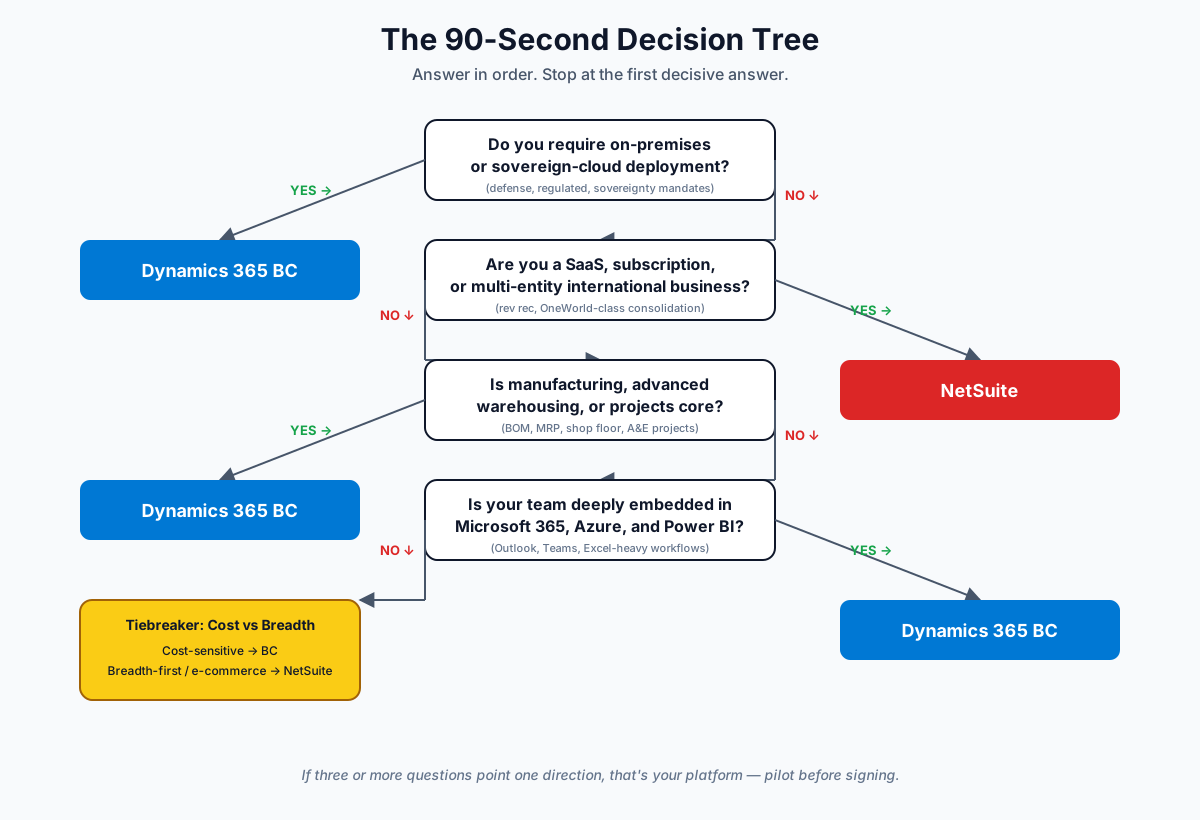
Forget vendor scorecards. Answer these seven questions honestly:
- Are you a Microsoft shop (Office 365, Azure, Teams central to operations)? → BC advantage.
- Do you have multiple entities or international subsidiaries? → NetSuite advantage.
- Is manufacturing a core capability? → BC advantage (with ISVs).
- Are you a SaaS or subscription-based business? → NetSuite advantage.
- Is your in-house IT capacity limited? → NetSuite tilts slightly (fewer infrastructure decisions).
- Are you cost-constrained? → BC advantage at the same scope.
- Will you need on-premises or sovereign cloud deployment? → BC is your only viable option.
Score 4+ answers favouring one direction? That's your platform.
Frequently Asked Questions
Is NetSuite more expensive than Dynamics 365 Business Central?
Yes, materially. For a 50-user deployment, NetSuite's five-year TCO typically runs 2–3x higher than Business Central — roughly $960K–$1.8M versus $376K–$685K based on 2026 pricing. NetSuite often replaces multiple separate systems (CRM, billing, expense management) that would be additional spend with Business Central, so the gap narrows when you compare full stacks. Still, on a like-for-like core ERP basis, NetSuite is the more expensive platform.
Can Dynamics 365 Business Central scale to 500+ users?
Yes, with caveats. Microsoft positions BC as a mid-market product (typically 10–500 users). Above that, larger organisations are often steered toward Dynamics 365 Finance & Operations (formerly AX), which is a different product entirely with a different licence model and implementation profile. If you anticipate crossing 500 users within three years, that conversation needs to happen early — and you should also be looking at major ERP vendor vs niche ERP for the wider context.
Which has better AI and Copilot capabilities in 2026?
As of 2026, Business Central has a meaningful lead due to deep Microsoft Copilot integration — natural-language queries, AI-assisted document processing (sales orders, vendor invoices), and Copilot Studio for custom agents are all production features. NetSuite's "Text Enhance" and other AI features are improving rapidly but trail Microsoft's investment level. For organisations where AI productivity is a top-three buying criterion, BC currently wins.
How long do NetSuite contracts lock you in, and how hard are renewals?
Typically three years, with annual or multi-year payment options. Renewals are notoriously firm and often include 8–15% annual uplifts. Negotiate hard up front, lock multi-year pricing, and insist on uplift caps. Business Central uses a more transparent per-user model with annual or three-year commitments; renewal uplifts are typically 0–6%. For long-term TCO predictability, BC is materially friendlier.
Does Business Central have a built-in CRM?
Not really — it has a basic relationship management module that handles contacts and simple sales tracking. For real CRM functionality (opportunity management, marketing automation, customer service), you add Dynamics 365 Sales as a separate licence at roughly $65–$95/user/month. NetSuite's CRM is built into the core platform with no additional licence. For a deeper comparison, see ERP vs CRM — what's the difference.
Can I run NetSuite on-premises or in a sovereign cloud?
No. NetSuite is exclusively a public cloud product, hosted in Oracle's data centres. If on-premises, hybrid, or sovereign cloud (UK gov, EU sovereign, GCC, US Federal) is a hard requirement, Business Central is your only viable option between the two. This is the single most common reason regulated industries, defence contractors, and certain GCC organisations rule NetSuite out before any other evaluation criteria.
Which is easier to implement, and how much faster?
Business Central on average, by 30–40% in time and cost for comparable scope. The advantage narrows for highly customised deployments and disappears entirely if you need OneWorld-class consolidation, which BC can replicate only with extensions and partner work. For a no-customisation, single-entity, Microsoft-centric mid-market deployment, BC is genuinely the faster route to value.
How often do they release new features, and how disruptive are upgrades?
NetSuite ships two major releases per year, mandatory, all customers upgraded simultaneously (typically March and August). You cannot defer. Business Central also ships two major releases per year (April and October) plus monthly minor updates for cloud customers — but tenants can defer upgrades by up to 90 days, which is helpful for testing. On-premises BC customers control upgrade timing entirely. Disruption is minimal on both when extensions are properly built; legacy custom code is the usual culprit when upgrades break.
The Final Verdict
The mistake most ERP buyers make is treating this as a feature checklist battle. It isn't. NetSuite and Business Central are both excellent platforms with specific personalities and ideal customer profiles.
NetSuite is for you if:
- You're a multi-entity, multi-currency, internationally-operating mid-market business
- You're a SaaS, subscription, or services company with revenue recognition complexity
- You're a fast-growing e-commerce or D2C brand
- You want a single, unified platform with minimal infrastructure decisions
- You can absorb the higher subscription cost in exchange for breadth
Business Central is for you if:
- You're a Microsoft-centric organisation (Office 365, Azure, Teams)
- You're a manufacturer or distributor with operational complexity
- You're a project-based business (engineering, construction, professional services)
- You value flexibility (cloud, on-premises, hybrid, sovereign)
- You want predictable, transparent per-user pricing with lower TCO
There is no universally "better" ERP. There is only the platform that aligns with how your business actually operates.
Next Steps
If you're still uncertain after working through the framework above, do these moves before signing anything:
- Run a parallel scoping workshop with two implementation partners — one NetSuite, one Business Central. Compare both proposals and how well they understand your industry.
- Request reference customer calls with companies of your exact size, region, and industry. Demo videos lie; reference customers usually don't.
- Build your own 5-year TCO model including ISVs, integrations, regional tax tooling, and a realistic implementation contingency.
- Pilot a proof-of-concept on one process (quote-to-cash is a good one) before committing to the full platform.
The right ERP decision saves your business millions over a decade. The wrong one defines your operational pain for the same length of time.
Get your free ERP budget reality check →
ERPLenz has no resale relationship with NetSuite, Microsoft, or any other ERP vendor. We publish the comparisons buyers actually need — TCO models, post-mortems, and implementation realities — because the cost of choosing wrong runs into the millions.
Further reading