ERP Data Migration Guide: What to Move and What to Leave Behind
Dylan Coetzee · ERP Solution Architect & Founder · 14 min read · May 2026
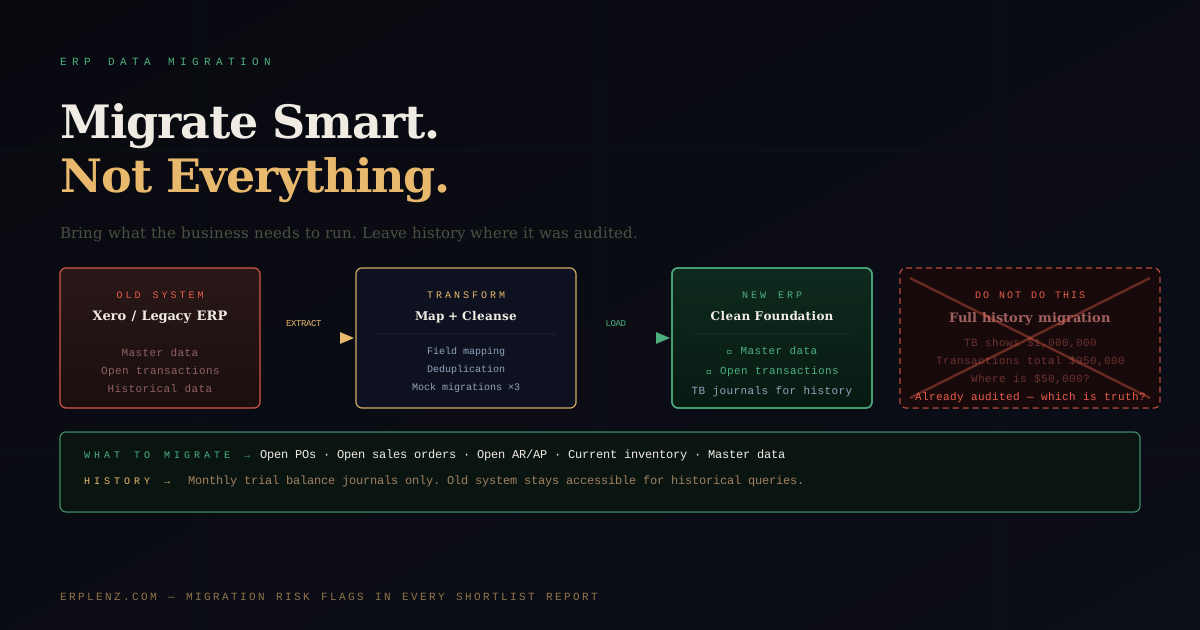
Quick answer: ERP data migration should move open transactions, current master data, and historical financials as summarised trial balance journals — nothing more. Migrating full transaction history into a new ERP introduces reconciliation problems that consume months of effort and rarely deliver value. Keep the legacy system in read-only mode for audit and historical enquiry. Cleanse source data before extraction, run two or three mock migrations, and validate balances before go-live.
At some point in every ERP implementation, someone in the business asks: "Can we bring across all our historical transactions?"
The answer is technically yes. The answer in practice is: you almost certainly should not — and the reasons matter before your project team agrees to something that will absorb months of effort and produce results nobody can fully trust.
ERP data migration is consistently one of the most underestimated workstreams in any implementation. It doesn't appear in vendor demos. It rarely sits on a steering committee agenda until it's gone wrong. But it determines whether your new system opens with a clean, auditable foundation — or whether it opens carrying a decade of accumulated mess from a system you just replaced.
This guide covers what to migrate, what to leave behind, how the cutover actually runs, and what to ask every vendor before you sign.
What ERP Data Migration Actually Involves
Moving to a new ERP is not a file transfer. Customers, suppliers, products, inventory quantities, financial balances, open orders, and transaction history all need to be extracted from the old system, transformed into the new system's data model, validated, and loaded.
That sounds mechanical. It isn't. Every ERP has its own data architecture. A customer record in NetSuite is not structured like one in Odoo, SAP Business One, or Microsoft Dynamics 365 Business Central. Fields don't always map cleanly. Mandatory fields in the new platform may not exist in the old one. Lookup values — payment terms, tax codes, warehouse locations, units of measure — need to be recreated and mapped before a single transaction can be loaded.
Extraction is usually the easy part. Most platforms export to CSV, XML, or JSON. Transformation is where the time goes. Validation — confirming that what landed in the new system matches what left the old one — is where the surprises live.
International businesses add a further dimension. Multi-entity migrations need to reconcile across currencies, intercompany balances, and regional tax regimes — UK MTD, EU VAT, US sales tax (Avalara/Vertex), Australian GST, Indian GST, Saudi ZATCA, Brazilian Nota Fiscal. A migration that works for a single-entity US business will quietly fall over when you bring a UK subsidiary on board with reverse-charge VAT rules.
The Right Strategy: Open Transactions + Trial Balance Journals
The recommendation experienced implementation consultants consistently land on: migrate open transactions only, and bring historical financial data across as summarised trial balance journals.
Open transactions are the live obligations the business needs to operate from day one:
- Open purchase orders (ordered, not yet received)
- Open sales orders (committed to customers, not yet invoiced)
- Open accounts receivable (what customers owe you)
- Open accounts payable (what you owe suppliers)
- Current inventory quantities and values
- Current employee and payroll records (if in scope) — taking into account regional payroll specifics for US, UK, EU, AU, and India
- Master data: customers, suppliers, products, chart of accounts, price lists, tax codes
These are the records the business needs to function from the first day on the new system. Without them, you cannot receive goods, invoice customers, or pay suppliers. They must come across, and they must be accurate.
Trial balance journals are the summarised closing balances from your historical periods — loaded as monthly journal entries. A January closing balance for revenue becomes a single journal entry in the new system: AUD 1,200,000 to revenue as at 31 January. The transactional detail stays in the old system.
This is the clean, auditable way to establish opening financial position without importing historical transaction complexity.
Why You Should Not Migrate Historical Transactions
This is the part most businesses resist hearing, and the part that causes the most pain when ignored.
The appeal is understandable. Finance wants year-on-year reports in the new system. Sales wants full customer order history. Management wants a single source of truth from inception. These are legitimate wants. They are not sufficient reasons to migrate historical transactions into a production ERP.
Reconciliation is harder than it looks. Consider a trial balance at cutover showing cumulative revenue of USD 1,000,000. You migrate the historical transactions. The new system totals them at USD 950,000. There is a USD 50,000 difference.
Now find it.
That gap could sit anywhere across years of transactions, hundreds of customers, multiple financial periods, multiple currencies. Some transactions may have been manually adjusted in the old system in ways the new system doesn't replicate. Some reflect data entry errors that were never corrected because "the trial balance balanced anyway." This is not hypothetical. It is what happens on virtually every project that attempts full historical transaction migration. Teams spend weeks — sometimes months — hunting differences that are genuinely difficult to explain and even more difficult to resolve.
Historical financials have already been audited. The years of data in your old system were signed off against the statements produced. Re-migrating those transactions creates a parallel set of records that should produce identical results — but won't, for the reasons above. The old system stays accessible after cutover precisely for this reason. Historical enquiries and audit requests are handled by referencing the legacy system for pre-go-live periods. This is the correct operating model, not a workaround.
The cost is disproportionate to the value. Full historical transaction migration is one of the most expensive workstreams in an ERP project. Panorama Consulting's annual research consistently identifies data migration as a top driver of cost and timeline overruns. The value it delivers — running reports in the new system that you could run in the old one anyway — rarely justifies the cost. For the broader pattern, see why ERP implementations fail.
The Cutover Process: How ERP Data Migration Actually Happens
A well-managed ERP data migration runs in distinct stages. Timing matters.
1. Data extraction and profiling (early in the project). Extract a copy of source data in month one, not at go-live. This gives you time to understand what you have: duplicates, incomplete records, inconsistent coding, structural mismatches. The earlier these surface, the cheaper they are to fix.
2. Data cleansing. Fix the source data before you migrate, not after. Merge duplicate customers. Archive inactive suppliers rather than migrate them. Rationalise product codes that no longer conform. Every problem fixed in source is a problem you don't debug in production under go-live pressure.
3. Mock migrations. Run at least two — ideally three — full mock migrations into a test environment before the real cutover. Each mock reveals transformation issues, mapping errors, and validation failures that would be catastrophic on go-live day. Mocks are not optional on any project of consequence.
4. Cutover freeze. Typically 2–5 business days before go-live, data entry in the old system is frozen. The migration team extracts the final live dataset and loads it. This is the data the business will operate on.
5. Go-live validation. Before users access the live system, finance validates opening balances against the legacy system. Inventory quantities are spot-checked against physical count. A sample of open orders is verified transaction by transaction. Only when validation passes does the switch happen.
Master Data: The Foundation Everything Runs On
Before any transactional migration succeeds, master data must be correct. Master data is the reference everything else depends on: customers, suppliers, items, chart of accounts, warehouses, payment terms, tax codes, banking details (SEPA, ACH, Faster Payments, NPP, UPI, PIX — depending on geography).
If a customer record is incomplete, every invoice to that customer has a problem. If an item lacks a unit of measure, every inventory transaction fails. If tax codes are misaligned with regional rules in Avalara, Vertex, or Sovos, your first month of compliance reporting collapses.
A practical rule: for every hour planned on transactional migration, plan an equal amount on master data preparation. It is the most underestimated activity in the entire workstream — and the single biggest determinant of migration success.
What Happens in the Old System After Go-Live
Your old system does not disappear at go-live. It should remain accessible in read-only mode. Most vendors permit this; some contracts include a post-cutover read-access period specifically for this purpose.
For the first 12 months after go-live, the legacy system will be referenced regularly — historical invoice queries, audit requests, year-on-year comparisons, and the occasional "what did we actually pay for X in March last year?" question. Budget for that access to be maintained. Don't decommission until you've closed the first full financial year on the new system and confirmed all reporting and audit requirements are satisfied.
For how this fits into ongoing operations, see ERP ongoing support and maintenance.
ERP Data Migration Approaches Compared
| Approach | What's migrated | Cost & effort | Reconciliation risk | When it's appropriate |
|---|---|---|---|---|
| Open transactions + trial balance journals | Master data, open AR/AP/PO/SO, current inventory, monthly TB journals | Lowest | Low — TBs reconcile cleanly | Default for almost every project |
| Open transactions + 12 months of detail | Above, plus one financial year of transaction detail | Moderate | Moderate — single-year reconciliation manageable | Businesses with audit cycles needing rolling 12-month comparatives in-system |
| Full historical migration | Every transaction since system inception | Highest — often double the migration budget | Severe | Rarely justified; usually a regret decision |
| Greenfield (no historical data) | Master data only, opening balances entered manually | Very low | None | Very small businesses or where legacy data is unrecoverable |
The Questions to Ask Every Vendor About Data Migration
Migration methodology is one of the areas where vendor proposals diverge most sharply from delivery reality. Most proposals describe a clean, orderly process. Most actual migrations are messier. Ask these before you sign:
- What is your standard approach — open transactions plus trial balance journals, or full historical migration? Why?
- How many mock migrations do you run as standard, at what points in the project?
- Who owns data cleansing — your team or ours? What tools do you use?
- What happens if reconciliation issues surface in a mock migration? What is the escalation path?
- What does your post-cutover read-access model for the legacy system look like, and how long is it maintained?
- Have you migrated from our current system before? What were the specific transformation challenges?
- How do you handle multi-currency, intercompany, and multi-entity reconciliation if applicable?
A vendor who answers these fluently — with specific methodology, not generalities — has delivered migrations before. A vendor who responds with vague "flexibility" hasn't, or is hiding something. For how to evaluate this alongside other selection signals, see implementation partner vs vendor direct.
Frequently Asked Questions
How long does ERP data migration take?
For a Mid-Market business (75–500 employees, USD 10M–100M revenue), data migration typically consumes 15–25 percent of total implementation effort — equating to 2–4 calendar months of concentrated work within a 9–14 month project. Small Business implementations (10–75 employees) compress this to 4–8 weeks. Upper Mid-Market and Enterprise migrations involving multiple entities, currencies, and regional tax regimes routinely run 6–9 months. The variable is not platform — it's source data quality and the number of integrated systems. See how long does ERP implementation take for full timeline benchmarks.
Should we migrate historical transactions to our new ERP?
No, in almost every case. Migrate current master data, open transactions, and monthly trial balance journals for historical periods. Leave detailed historical transactions in the legacy system, kept read-only for audit and enquiry. The reconciliation effort required to make historical transactions tie out in a new ERP rarely justifies the value — and the differences that emerge can erode trust in the new system from day one.
What is a trial balance journal in ERP migration?
A trial balance journal is a summarised journal entry that captures the closing balance of each general ledger account at a specific historical date. Instead of migrating every transaction that contributed to that balance, you migrate one journal per account per period. This establishes opening financial position cleanly, satisfies audit requirements, and allows comparative reporting against historical periods without re-importing transactional complexity.
How many mock migrations should we run before go-live?
Two as a minimum, three as best practice. The first mock identifies major structural and mapping issues. The second tests the fixes and exposes secondary issues that the first migration masked. The third — closest to go-live — confirms the runbook is repeatable under cutover conditions. Skipping mocks is one of the most common false economies in ERP delivery and a reliable predictor of go-live problems.
Who is responsible for ERP data cleansing — the client or the implementation partner?
The client owns the data. The implementation partner can provide tools, templates, and guidance, but the subject-matter judgement — which customers are genuinely duplicates, which suppliers are truly inactive, which product codes can be rationalised — sits with the business. Implementations that try to delegate cleansing entirely to the partner end up with technically clean but operationally wrong data. Plan internal resource accordingly.
What master data needs to be ready before ERP migration begins?
Customers and suppliers with complete tax, banking, and contact details. Products with units of measure, costing methods, and category structures. Chart of accounts mapped to the new system's structure. Warehouses and locations. Payment terms, tax codes aligned with regional engines (Avalara, Vertex, Sovos, or native), price lists, and currency settings. Banking details formatted for regional payment rails (SEPA, ACH, Faster Payments, NPP, UPI, PIX). Master data preparation routinely takes longer than transactional migration.
How long should we keep the legacy ERP system after go-live?
Minimum 12 months in read-only mode — long enough to close the first full financial year on the new system and complete the subsequent audit. Many businesses keep legacy access for 24–36 months, particularly in regulated industries where statutory retention rules require accessible historical data. Budget for licence or hosting costs across this period; decommissioning prematurely creates audit risk that costs more than the saving.
Can ERP data migration be automated?
Partially. Extraction, transformation, and load (ETL) tooling — including vendor-supplied migration utilities, dedicated platforms like Celigo or Boomi, and open-source frameworks — automates the mechanical movement of data. What cannot be automated is the business judgement: which records to keep, how to map legacy concepts to new structures, how to handle exceptions, and how to validate that the migrated state matches the source. Treat automation as a productivity tool, not a substitute for governance.
How ERPLenz Approaches Data Migration Risk
Migration complexity is a direct function of platform fit. The closer a platform's data architecture is to how your business actually operates, the less transformation is required — and the lower the risk of introducing errors you'll spend months reconciling.
ERPLenz's assessment scores platforms against your current system environment and operational profile, flagging where migration complexity will be higher due to structural differences. For each vendor on your shortlist, your report includes vendor-specific questions tailored to your risk profile — so you walk into every demo already knowing what to pressure-test and what traps other businesses have hit with that platform.
The goal is to surface the real implementation picture before you sign — not after you're committed.
See what your report includes →
Migration risk is selection risk wearing a different suit. ERPLenz exists to expose both before contracts get signed — built by people who've cleaned up the alternative.
Related reading