Cloud vs On-Premise ERP in 2026: The Honest Guide (Including the Third Option)
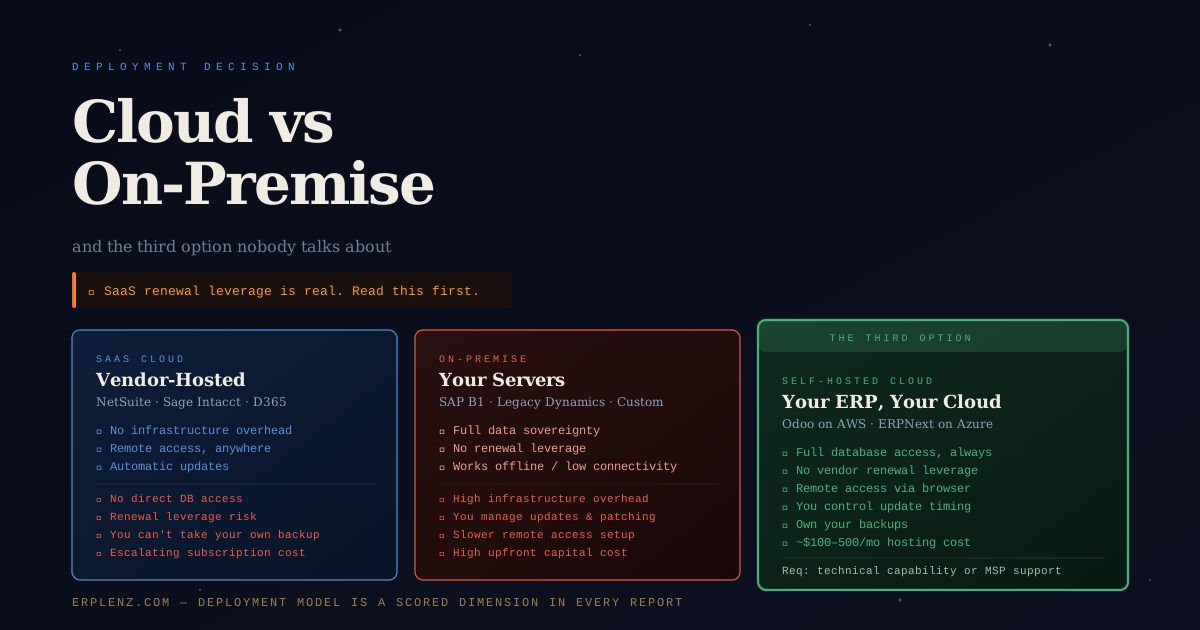
Quick answer: Cloud vs on-premise ERP is not a binary in 2026. There are three viable deployment models: vendor-hosted SaaS cloud (low overhead, high renewal leverage), traditional on-premises (full control, high IT cost, narrow use cases), and self-hosted cloud (cloud economics on your own infrastructure with full data access). Most buyers default to SaaS without seriously considering the third option — and many regret it at the first renewal.
Most articles comparing cloud and on-premise ERP read like vendor marketing copy. They list cloud's benefits — scalability, no infrastructure overhead, automatic updates — and treat on-premises as the legacy option that only stubborn IT departments cling to.
That is not the full picture.
This article covers the real trade-offs: the leverage cloud vendors hold over you at renewal, the data-access constraints most buyers do not discover until they are locked in, the regional sovereignty rules that quietly disqualify SaaS for some workloads, and a third deployment option most businesses never seriously consider — one that gives you the operational benefits of cloud ERP without surrendering control.
The three deployment models
Before the trade-offs, be precise about what is actually on the table.
1. SaaS cloud ERP (vendor-hosted) — The vendor hosts the software on their infrastructure. You access it via browser. You pay a subscription, typically annual. The vendor controls the environment, updates, and uptime. Examples: NetSuite, Dynamics 365 Business Central (cloud), Sage Intacct, Acumatica Cloud, SAP S/4HANA Cloud Public Edition.
2. Traditional on-premises ERP — The software is installed on servers your organisation owns and operates, typically in your own data centre or co-location. You usually own the licence perpetually, manage the infrastructure, and control update timing. Examples: SAP Business One (on-prem), legacy Dynamics NAV/AX deployments, Syspro on-premises, SAP S/4HANA on-premises.
3. Self-hosted cloud ERP — You host an open-source or licensable ERP on cloud infrastructure you control — AWS, Azure, Google Cloud, OVHcloud, Hetzner, regional sovereign clouds (G-Cloud, GovCloud, MSFT EU Data Boundary). You control the environment, data, and update schedule, but get uptime, scalability, and remote-access benefits of cloud. Examples: Odoo Community on AWS or Hetzner, ERPNext on a VPS, self-hosted Dolibarr or iDempiere, SAP S/4HANA Private Edition on Azure.
Most ERP comparisons treat deployment as a binary. It isn't.
The SaaS cloud case: what vendors tell you
The vendor pitch for SaaS cloud ERP is largely accurate:
- No infrastructure investment. No servers, no data centre overhead, no IT staff dedicated to hardware maintenance.
- Automatic updates. The vendor pushes updates; you are always on a current version.
- Remote access. Users log in from anywhere; no VPN required.
- Faster implementation. Less environment setup; faster path to go-live.
- Scalability. Adding users or capacity does not require hardware procurement.
- Predictable per-user cost at year one.
For most growing organisations these are genuine benefits. If your IT team is small and you do not want to manage infrastructure, SaaS removes a real operational burden. But the pitch stops before it reaches the uncomfortable parts.
What SaaS cloud vendors do not tell you
1. Renewal leverage: you are more locked in than you think
When you sign a SaaS ERP contract, you typically commit to one to three years. In year one, pricing is competitive. The vendor is motivated to win your business.
By year three, the picture changes.
Your data lives in their system. Your team has been trained on their workflows. Migrating to a new ERP requires a full re-implementation — six to eighteen months of effort, significant cost, and operational risk. The vendor knows this. At renewal, some vendors — NetSuite being a frequently cited example — apply price increases materially above what the original proposal implied. Uncapped 7–10% annual uplifts compound viciously. Three years of compounding turns a US$120K subscription into a US$160K one without a single new user.
The switching cost is not just the new system. It is the migration, the re-training, the data conversion, the parallel running period, and the productivity loss. For most Mid-Market organisations, that is a seven-figure decision.
Questions to ask before signing any SaaS ERP contract:
- What is the contractual cap on annual price increases at renewal?
- Can we export all our data in a standard, portable format (CSV, JSON, XML, Parquet) at any time, at no additional cost?
- What does a migration project look like, and who pays for data extraction?
- What happens to our data if we stop paying — is there a defined off-boarding window?
- Are the implementation partner and named consultants written into the SOW?
For deeper coverage of the contract terms that matter, see how to select an ERP system.
2. Data access and ownership: yours in theory
SaaS vendors will tell you that you own your data. That is technically true and practically limited.
Common constraints:
- No direct database access. You cannot run a custom SQL query against the production database.
- Extraction rate limits. API calls are rate-limited; extracting large historical datasets is slow.
- Custom report limitations. Some platforms require paid professional services to build reports beyond the standard library.
- No autonomous backups. You cannot take your own production database backup.
- Customisation portability. Workflows, scripts, and customisations rarely export cleanly.
For most operational reporting this does not matter. For BI, data warehouse integration, regulator-mandated archiving, or migration planning, it can be a serious constraint. If you are building a Snowflake, BigQuery, Databricks, or Microsoft Fabric data platform around your ERP, ask very specifically how raw data extraction works — and at what cost.
3. Data sovereignty and regional compliance
SaaS deployment models intersect with regional data laws in ways the standard sales pitch tends to skip past. Examples that disqualify or constrain multi-tenant SaaS depending on workload:
- UK and EU GDPR plus the Schrems II ruling on US data transfers — material for personal data
- India DPDP Act 2023 — data localisation expectations for sensitive personal data
- KSA PDPL and ZATCA e-invoicing — sovereignty and integration mandates for Saudi-resident data
- Australia Privacy Act and APRA CPS 230 — operational resilience and data residency
- UAE Data Protection Law and DIFC/ADGM regimes — financial services specifics
- US ITAR and CMMC — defence-related workloads
- Brazil LGPD and Mexico LFPDPPP — LATAM personal data rules
Many SaaS ERPs offer regional data residency, but multi-tenant architecture and shared-control planes can still create issues for regulated workloads. If sovereignty matters, ask for the architecture diagram, the sub-processor list, and the encryption-at-rest and in-transit key custody model — in writing.
4. Contractual uptime and support: SLAs versus reality
A 99.9% uptime SLA entitles the vendor to roughly nine hours of downtime per year before you are eligible for a credit — typically a fraction of your monthly fee. 99.95% drops that to under five hours. Ask specifically about support tiering, escalation paths, named technical account managers, and weekend/holiday response times before you sign. Month-end is when ERP outages bite hardest and when standard support tiers are stretched thinnest.
The on-premises case: when it still makes sense
Traditional on-premises ERP is in genuine decline. But it is not dead — and for specific organisations, it remains the right choice.
It makes sense when:
- You operate in a data-sovereign or heavily regulated environment (defence, healthcare, government, some financial services)
- You have low-connectivity sites (manufacturing plants, remote warehouses, mines, vessels) where cloud-only is operationally fragile
- You have deep customisation requirements that SaaS contracts do not permit
- You want long-term predictable cost — a perpetual licence paid once plus 18–22% annual support is often cheaper than SaaS over a ten-year horizon at scale
- Your IT organisation already runs comparable workloads and the marginal infrastructure cost is small
Be honest about the IT capacity required: dedicated DBAs, infrastructure engineers, a disaster recovery site, security patching cadence, and an upgrade roadmap. The trade-off lives entirely in your team, not the vendor's.
The third option: self-hosted cloud ERP
This is the option most buyers never seriously consider — and it is often the most sensible choice for a specific profile.
What you get:
- Full database access. Your data, your server, your backups. Run any query you want.
- No renewal leverage. You own (or self-licence) the software. No subscription escalator.
- Cloud scalability and remote access. Users access via browser over the internet. No VPN, no on-site hardware.
- Control over update timing. You decide when to upgrade, you test in staging, no surprise vendor updates pushed at quarter-end.
- Sovereignty by design. Pick the region, cloud provider, and key custody model that match your regulatory regime.
- Open-source optionality. Platforms like Odoo Community and ERPNext let you modify application logic, not just configuration.
The trade-offs:
- You are responsible for server maintenance, security patching, database backups, and DR
- You will not automatically get new features — you plan and execute upgrades
- Some enterprise features require paid licensing even in self-hosted mode
- You need either internal capability or a credible managed-services partner
Who it is right for:
- Small Business and lower Mid-Market organisations with in-house IT capability or a strong managed-services partner
- Organisations with hard data residency requirements
- Organisations that want cloud ERP economics without SaaS vendor lock-in
- Technically capable businesses running serious ERP at a fraction of SaaS cost
In our experience, self-hosted Odoo or ERPNext on AWS or Hetzner is a credible Mid-Market option up to roughly 200 users, with the right partner and operational discipline.
Side-by-side comparison
| Dimension | SaaS cloud | Traditional on-premises | Self-hosted cloud |
|---|---|---|---|
| Infrastructure ownership | Vendor | You | You (on cloud provider) |
| Data access | Limited (API / export) | Full | Full |
| Update control | Vendor-driven | You | You |
| Renewal leverage risk | High | None | None |
| Remote access | Native | Requires VPN / gateway | Native |
| Upfront cost | Low | High | Low–Medium |
| Long-term cost | Escalating subscription | Predictable maintenance | Hosting + optional support |
| IT overhead | Minimal | High | Medium |
| Customisation depth | Limited by vendor | Unrestricted | Unrestricted |
| Sovereignty control | Vendor regions only | Full | Full |
| Best for | Growth-stage without IT depth | Regulated or connectivity-constrained | Cloud benefits with data control |
The decision framework
Choose SaaS cloud if:
- You do not have in-house IT capability and do not want infrastructure overhead
- You are growing quickly and want to focus on operations, not ops
- You have negotiated contractual protections at renewal upfront (price cap, data export, exit window)
- You operate in regions and industries where multi-tenant SaaS is compliant for your workload
Choose on-premises if:
- You have strict data sovereignty or compliance requirements your SaaS vendor cannot satisfy
- You run in low-connectivity environments where cloud-only is operationally fragile
- Your customisation needs exceed what any SaaS vendor will support contractually
- You already operate comparable workloads and the marginal IT cost is small
Choose self-hosted cloud if:
- You want cloud economics and remote access without handing control to a vendor
- You need full database access for analytics, BI, custom development, or regulator archiving
- You have technical capability in-house or a credible managed-services partner
- You are in a Small Business or lower Mid-Market footprint where open-source platforms (Odoo, ERPNext) have the functional depth you need
If you are still mapping requirements to deployment models, the structured fit framework is in which ERP is right for my business. For the tier-by-tier cost picture across deployment models, see how much does ERP cost. For the broader selection methodology, see how to choose an ERP in 2026.
Frequently Asked Questions
Is cloud ERP always cheaper than on-premises?
No. SaaS cloud is usually cheaper in years one to three because the upfront capital expenditure is replaced with operating expenditure. Over a seven-to-ten-year horizon, on-premises can be cheaper at scale — particularly when you account for compounding renewal uplifts. The honest answer requires a full five-year TCO model that includes implementation, integration, support, infrastructure, and renewal escalation.
Can SaaS ERP meet data residency requirements?
Often, but not always. Most major SaaS ERPs (NetSuite, Microsoft, SAP, Oracle, Sage) offer regional data centres covering EU, UK, US, Australia, Canada, India, and parts of the GCC. However, multi-tenant control planes, sub-processor chains, and US data-access laws can still create issues for regulated workloads. If sovereignty is non-negotiable, get the architecture diagram, sub-processor list, and key-custody model in writing — and validate them with your legal counsel.
What is the difference between cloud ERP and SaaS ERP?
The terms are often used interchangeably, but they are not the same. "Cloud ERP" describes any ERP delivered over the internet from cloud infrastructure — it can be vendor-hosted SaaS, vendor-managed hosted single-tenant, or self-hosted. "SaaS ERP" specifically refers to multi-tenant, vendor-hosted, vendor-managed subscription delivery. SaaS is a subset of cloud, not a synonym.
Is Odoo or ERPNext suitable for a real Mid-Market business?
Yes — both run real Mid-Market operations across Europe, India, LATAM, and the GCC, particularly in distribution, light manufacturing, and professional services. The trade-off is operational responsibility: you (or a managed-services partner) handle hosting, upgrades, customisation, and security. Functional depth is genuine; the constraint is implementation partner quality, not the software.
What happens to my data if my SaaS ERP vendor goes out of business?
Read your contract. Most reputable SaaS contracts include an off-boarding window (typically 30–90 days) during which you can export data. In practice, "out of business" rarely means immediate shutdown — vendors are typically acquired (Infor, Epicor, and Sage have all rolled up smaller platforms). Acquisition can be worse than failure for customers, because product roadmaps shift overnight. Negotiate explicit data export rights and a defined exit window regardless of how stable the vendor looks today.
Can I move from SaaS ERP to self-hosted later?
Technically yes; practically expensive. A SaaS-to-self-hosted migration is a full re-implementation of the new platform — six to eighteen months depending on scope. Configurations, scripts, integrations, and customisations rarely port cleanly. The cleanest moment to choose deployment model is during initial selection. Plan deliberately.
How does cloud vs on-premises affect implementation timeline?
Cloud SaaS typically goes live 20–40% faster because environment setup, infrastructure provisioning, and version management are removed from the critical path. The functional, data, integration, and change-management workstreams remain the same. Full breakdown by tier in how long does ERP implementation take.
What about hybrid deployment — some on-prem, some cloud?
Hybrid is common for organisations transitioning off legacy systems. A typical pattern: cloud ERP for finance, procurement, and CRM, on-premises for MES, WMS, or specialised industry workloads, with iPaaS middleware (Boomi, Workato, MuleSoft) bridging them. Hybrid adds integration complexity and increases the importance of your data architecture — see ERP integration with existing systems for the patterns that hold up.
How ERPLenz helps
Deployment model is one of the weighted dimensions in the ERPLenz scoring engine. When you complete the diagnostic, your answers about infrastructure preferences, IT capability, data access requirements, sovereignty constraints, and budget directly influence which platforms are scored as viable candidates.
SaaS-only platforms are flagged when your profile indicates self-hosted preference or sovereignty requirements. Open-source and self-hostable platforms are surfaced when they are genuinely the better fit. On-premises options are included when the operational profile justifies them.
Know your deployment options — and the renewal economics of each — before a vendor shapes your expectations.
Deployment is not a binary. It is a three-way trade-off between control, cost, and operational overhead — and the right answer depends on your tier, your tech depth, and the regulatory regime you actually operate in. The vendor pitching you SaaS will not walk you through option three.