ERP vs CRM: What's the Difference and Do You Need Both?
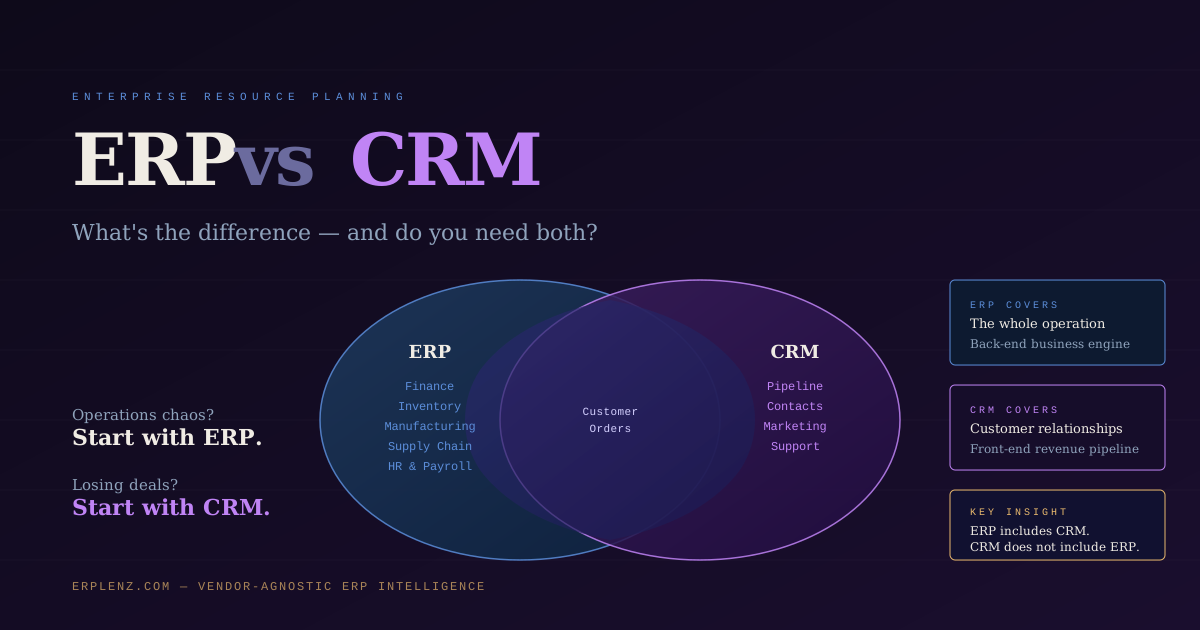
Quick answer: ERP (Enterprise Resource Planning) manages your operations — finance, inventory, procurement, manufacturing, HR. CRM (Customer Relationship Management) manages your sales pipeline and customer interactions. Most modern ERPs include a CRM module, but no CRM includes ERP. If your operations are chaotic, start with ERP. If your sales pipeline is broken but operations are fine, start with CRM. Most mid-market businesses eventually need both — often in a single integrated platform.
If you've been researching business software, you've inevitably run into both of these acronyms. Vendors throw them around interchangeably. Sales consultants conflate them when it suits their pitch. And the result is that many business owners, CFOs, and operations leaders are genuinely unsure what each system actually does — and whether they need one, the other, or both.
This article gives you a definitive answer. No jargon. No sales agenda.
What Is CRM (Customer Relationship Management)?
CRM stands for Customer Relationship Management.
At its core, a CRM is a system for managing your relationships with current and prospective customers. It tracks:
- Contact and account records (who your customers and leads are)
- Communication history (calls, emails, meetings)
- Sales pipeline and opportunities
- Marketing campaign engagement and lead scoring
- Customer service interactions and case management
Think of a CRM as your organisation's centralised customer address book — but intelligent. It tells you where every prospect is in the buying process, what conversations have happened, and what actions need to happen next.
Common CRM platforms (global): Salesforce, HubSpot, Zoho CRM, Microsoft Dynamics 365 Sales, Pipedrive, Freshsales, Monday CRM
A CRM lives at the front end of your business — it manages the customer-facing side.
What Is ERP (Enterprise Resource Planning)?
ERP stands for Enterprise Resource Planning.
An ERP is a system for managing your entire business operation — not just the customer-facing part. It integrates:
- Financial accounting and reporting (multi-currency, multi-entity)
- Inventory and warehouse management
- Procurement and supplier management
- Manufacturing and production planning
- Order management and fulfilment
- Human resources and payroll
- Project management and resource planning
- Compliance, audit trails, and regulatory reporting
Think of an ERP as the operational backbone of your business. It's the system of record for what you own, what you owe, what you've produced, what you've shipped, and how profitable you are.
Common ERP platforms (global): NetSuite, SAP S/4HANA, SAP Business One, Microsoft Dynamics 365 (Business Central and F&O), Oracle Fusion Cloud, Odoo, Acumatica, Sage Intacct, Syspro, Epicor, Infor
An ERP lives at the back end of your business — it manages everything that happens after a sale is made.
If you're not yet sure whether your business needs ERP at all, our guide on when a business actually needs an ERP walks through the operational signals.
ERP vs CRM: The Core Difference at a Glance
Here's the simplest way to think about it:
| Dimension | CRM | ERP |
|---|---|---|
| Primary focus | Customer relationships and sales pipeline | Business operations and financial management |
| Who uses it most | Sales, marketing, customer service | Finance, operations, supply chain, executives |
| What it tracks | Leads, contacts, deals, communications | Inventory, orders, invoices, costs, production |
| Core output | Revenue pipeline visibility | Operational and financial accuracy |
| System of record for | Customer data | Financial and operational data |
| Typical trigger to buy | Sales team is disorganised; deals are slipping | Finance can't close the books; operations are chaotic |
The key insight: ERP includes CRM functionality, but CRM does not include ERP functionality.
Most modern ERP platforms — Odoo, NetSuite, SAP Business One, Microsoft Dynamics 365 — have a built-in CRM module. It may not be as feature-rich as a standalone CRM like Salesforce or HubSpot, but it handles the core use cases: leads, opportunities, pipeline tracking, and customer communication history.
Do You Need Both an ERP and a CRM?
Possibly. Here's how to think about it.
You probably need a standalone CRM if:
- Your sales process is complex, with long cycles, multiple stakeholders, and high-value deals
- Your marketing team runs extensive lead nurturing campaigns that require advanced segmentation and automation
- You have a large sales team that needs deep pipeline analytics, territory management, and forecasting
- You're in an industry where Salesforce or HubSpot has built deep integrations with specialised tools (e.g., real estate, financial services, life sciences)
You can likely use your ERP's built-in CRM module if:
- Your sales cycle is relatively straightforward
- You don't need advanced marketing automation
- Your team is small enough that consolidated data in one system is more valuable than specialist CRM features
- You want to avoid the integration overhead and duplicate-data problems that come with running two separate systems
The Integration Argument
Many businesses run Salesforce or HubSpot alongside their ERP. This works — but it introduces complexity. Customer data lives in two places. Orders created in CRM need to sync to ERP for fulfilment. Invoice data in ERP doesn't automatically surface in CRM for the sales team. Every integration point is a potential failure point and a maintenance overhead.
Before committing to two separate systems, honestly evaluate whether your CRM requirements actually exceed what your ERP's built-in module can deliver. For most mid-market businesses ($10M–$100M revenue), the answer is no.
A Common Mistake: Buying CRM Before ERP
Many growing businesses buy a CRM first because the sales team is the most vocal department. The result: they get great pipeline visibility but their operations remain chaotic. They can see every deal in the pipeline — but can't reliably fulfil orders, track inventory, or produce accurate financial statements.
The operational backbone should come first. Once your ERP is solid, adding or upgrading your CRM capability is straightforward. Doing it in reverse creates a fragile data architecture that's expensive to untangle later. The cost of getting this order wrong is real — see our breakdown of ERP cost for the financial picture.
The Third Option: An ERP With a Strong Native CRM
Some ERP platforms have invested heavily in their CRM capability to the point where it genuinely competes with standalone tools:
- Odoo CRM — fully integrated with Odoo's sales, inventory, and finance modules; pipelines, email integration, lead scoring, and marketing automation all included
- NetSuite CRM — deep integration with NetSuite's order management and financial modules; strong for B2B businesses with complex quote-to-cash flows
- Microsoft Dynamics 365 — combined ERP + CRM suite; Sales and Business Central integrate tightly within the Microsoft ecosystem (Teams, Outlook, Power BI)
- Zoho One — bundles Zoho CRM with a full suite of business apps including Books, Inventory, and People; compelling for small businesses globally
- HubSpot + ERP via native integrations — HubSpot now has bi-directional connectors for NetSuite and SAP that work well for service businesses
For many organisations, one of these removes the need to buy and integrate a separate CRM entirely.
Quick Decision Framework: ERP, CRM, or Both?
Start here:
- Is your primary problem that your sales team is losing deals and has no pipeline visibility? → Start with CRM.
- Is your primary problem that your operations, finances, or inventory are out of control? → Start with ERP.
- Are both problems present? → Choose an ERP with a strong built-in CRM module (Odoo, NetSuite, Microsoft Dynamics 365, or Zoho One) and solve both from one platform.
- Do you have an established sales operation with complex enterprise CRM requirements? → Consider ERP + Salesforce or HubSpot with a well-planned, tested integration.
Once you've decided on direction, the implementation approach you choose and the partner you engage will shape the success of the project as much as the platform itself.
Frequently Asked Questions
Do I need both ERP and CRM?
Not always. Most modern ERPs (NetSuite, Odoo, Microsoft Dynamics 365) include a built-in CRM module that's sufficient for the majority of small and mid-market businesses. You only need a standalone CRM if your sales process is complex enough to justify the integration overhead — typically larger sales teams, long enterprise sales cycles, or advanced marketing automation requirements.
Can ERP replace CRM?
For many businesses, yes. The CRM modules in modern ERP suites cover the core use cases — contact management, sales pipeline, opportunities, and customer communication history. They typically lack the advanced marketing automation, lead scoring depth, and third-party integration ecosystem of dedicated CRMs like Salesforce or HubSpot.
Should I implement ERP or CRM first?
ERP first, if your operations are the main pain point. Operations are the foundation; sales sits on top of that foundation. Implementing CRM first while operations are chaotic creates beautiful pipeline visibility on top of a broken delivery system — which makes the customer experience worse, not better.
What is the best ERP with a built-in CRM?
For small businesses: Odoo and Zoho One both have strong, fully integrated CRMs included. For mid-market: NetSuite CRM and Microsoft Dynamics 365 (combining Business Central with Sales) are the strongest options. For larger enterprises: SAP S/4HANA + SAP Sales Cloud and Oracle Fusion + Oracle CX Sales are the dominant pairings.
What's the difference between ERP and accounting software?
Accounting software (Xero, QuickBooks Online, Sage Business Cloud) handles the financial side: invoicing, payments, bank reconciliation, basic reporting. ERP includes accounting but adds inventory, manufacturing, procurement, multi-entity consolidation, and operational workflows. The line is operational complexity, not company size.
Can Salesforce act as an ERP?
No, not in the traditional sense. Salesforce is a CRM platform with optional industry clouds (Manufacturing Cloud, Financial Services Cloud) that add domain-specific functionality. It does not provide general ledger, inventory ledger, manufacturing, or operational financial reporting capabilities that define an ERP system. Most Salesforce customers pair it with a separate ERP.
How ERPLenz Can Help
Understanding the difference between ERP and CRM is step one. Step two is figuring out which ERP is the right fit for your business — and whether its built-in CRM is strong enough that you don't need a second system.
ERPLenz scores 17 ERP platforms against your specific business profile across 116 weighted dimensions, including how well each platform's built-in CRM matches your sales process requirements. Your shortlist tells you not just which ERPs fit, but which can serve as your CRM as well — and which will need a Salesforce or HubSpot pairing.
It's vendor-agnostic. No ERP vendor pays to appear in results. Your shortlist is driven entirely by fit.
Begin your free ERP assessment →
Know which system is right — before you talk to a single vendor.
ERPLenz is a vendor-agnostic ERP selection platform serving businesses globally. Our deterministic scoring engine evaluates 17 ERP platforms across 116 weighted dimensions — no vendor pays for placement, and results are based on fit, not commercial relationships.