When Does a Business Actually Need an ERP? 5 Operational Signals That Matter More Than Revenue
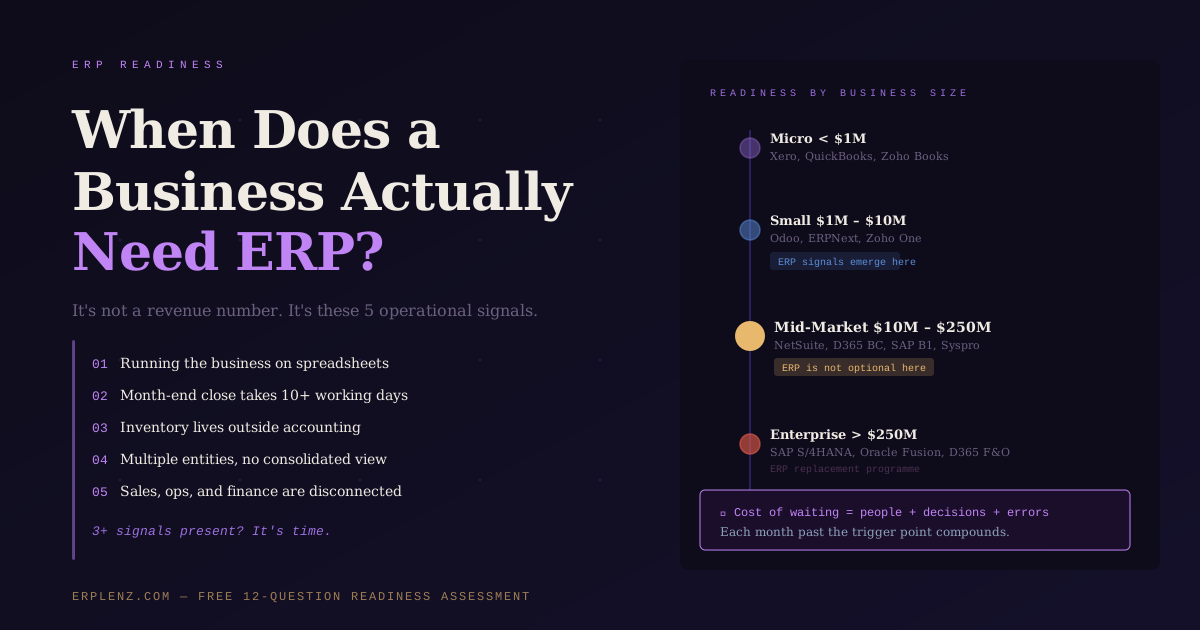
Quick answer: A business needs an ERP when operational complexity exceeds what accounting software and spreadsheets can manage reliably — typically when three or more of these signals appear together: spreadsheet-run processes, slow month-end close (>5 working days), inventory managed outside the accounting system, multi-entity consolidation, and disconnected sales/operations/finance systems. Revenue and headcount are imperfect proxies; operational signals are the trigger.
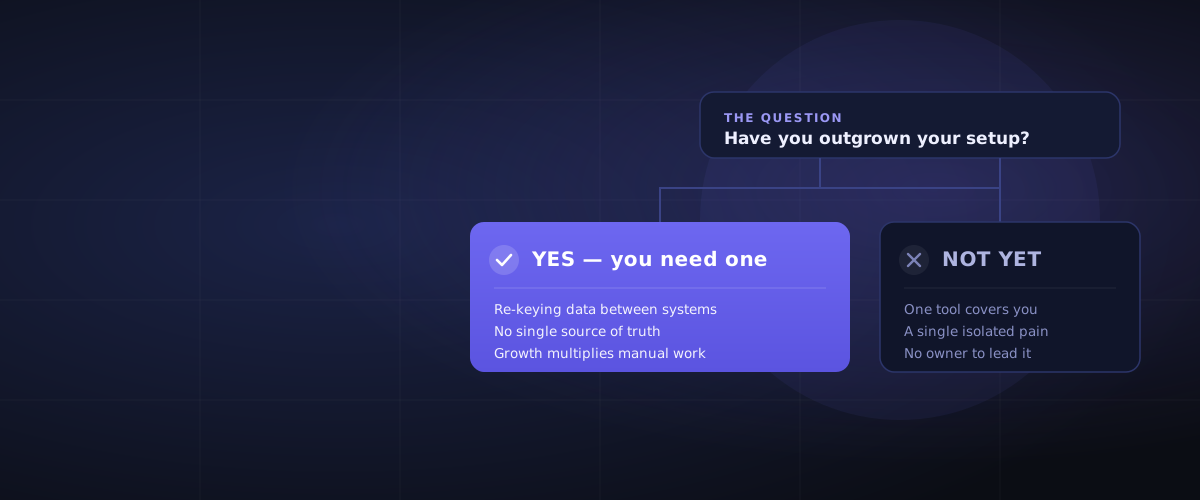
The question comes up at a predictable point in every growing business. The spreadsheets are getting unwieldy. The accounting software can't keep up with inventory. The finance team closes the month in two weeks instead of two days. Orders are falling through the cracks. And someone — usually the CFO or the operations director — asks: do we actually need an ERP system now? (If you are still weighing whether you need one at all, or how an ERP differs from accounting software, start with Do You Actually Need an ERP? — this guide focuses on the timing.)
The answer is rarely about a specific revenue figure. It's about operational signals. This article explains what those signals look like, how they apply by business size in any market (US, UK, EU, APAC, Middle East, Latin America), and what happens to businesses that ignore them for too long.
The Common Answer (And Why It's Incomplete)
The most frequently cited rule of thumb is: consider ERP when you have more than 10 employees and annual revenue above $1M USD.
That's a starting point, not a trigger. A $3M USD professional services firm with 15 staff and simple processes may be perfectly well-served by Xero or QuickBooks and a project management tool for years. A $2M manufacturer with 12 employees managing bills of materials, multi-step production, and lot-controlled inventory may need a proper ERP immediately.
Revenue and headcount are proxies. The real ERP readiness triggers are operational.
The 5 Operational Signals That Tell You It's Time
Signal 1: You're Running the Business on Spreadsheets
A spreadsheet is the universal workaround for systems that don't talk to each other. When you find yourself maintaining master spreadsheets for inventory levels, order tracking, job costing, or financial consolidation — and those spreadsheets are owned by individuals rather than a system of record — you have a data integrity problem waiting to materialise.
Spreadsheets break silently. A formula error in row 847 doesn't announce itself. A mismatched VLOOKUP doesn't send an alert. Decisions made on spreadsheet data are decisions made on data that may be wrong, and no one knows it yet.
The test: If a key person left tomorrow, would the business lose critical operational data that lives only in their spreadsheets? If yes, you need a system of record.
Signal 2: You Can't Close the Month in Under 5 Working Days
Fast, accurate financial reporting is a competitive capability. Businesses that close in 2–3 days make better decisions — they can see what's working and respond. Businesses that close in 15 days are managing history, not the present.
Slow month-end closes almost always trace back to: data sitting in disconnected systems, manual journal entries to reconcile differences between those systems, and spreadsheet-based consolidation. These are structural problems. No amount of overtime fixes them — only a system that captures the data correctly at source does.
The test: If your month-end close consistently takes more than 5 working days, you're carrying an operational cost in people-hours, and a decision-making cost in timing, that compounds every month.
Signal 3: Inventory Is Managed Outside Your Accounting System
This is the clearest manufacturing and distribution trigger. When your inventory quantities live in a spreadsheet or a standalone stock system, and your accounting system doesn't know what anything actually costs until someone manually reconciles it at month-end — you don't have visibility, you have a delayed reconstruction of reality.
Real-time inventory valuation, accurate cost of goods sold (COGS), and stockout prevention all require inventory to be a live ledger in the same system as your financials. If they're separate, you're always guessing.
Signal 4: You Have Multiple Entities With No Consolidated View
Once a business operates across multiple legal entities — subsidiaries, different trading names, international operations across the UK, US, EU, or APAC — the intercompany reconciliation, currency translation, and consolidated group reporting requirements exceed what any standalone accounting tool can handle reliably. What used to take one person one day now takes a team two weeks, and the numbers are still questioned at board level.
The test: If your group consolidation requires a manual process in Excel, and the CFO spends more time reconciling intercompany than interpreting results, the platform has been outgrown.
Signal 5: Sales Orders, Production, and Finance Are Not Connected
In a business where sales, operations, and finance run on separate tools that don't talk to each other in real time:
- Sales commits to a delivery date without knowing if inventory exists
- Purchasing doesn't know what to order because they can't see what's been promised
- Finance can't recognise revenue until operations manually confirms a shipment
- Customer queries require three different people to piece together an answer
This is the core ERP value proposition: a single source of truth where a sales order automatically reserves inventory, triggers production planning, drives purchasing requirements, and creates the financial obligation — in real time, without manual re-entry.
If you recognise three or more of these signals, you're past the readiness threshold. The next questions are which ERP and how to implement it — covered in our guides on how much an ERP actually costs and how long ERP implementation actually takes.
ERP Readiness by Business Size
Micro Business (<10 employees, <$1M revenue)
You almost certainly don't need an ERP yet. What you need is clean accounting software, a proper CRM, and clear processes. Complexity you introduce now will cost more to maintain than the value it creates.
Right fit now: Xero, QuickBooks Online, Zoho Books + basic inventory add-on
Triggers to revisit: Revenue crossing $1M USD with rapid growth, first employee hired to manage inventory, or first production/fulfilment workflow that breaks the accounting tool.
Small Business (10–75 employees, $1M–$10M revenue)
This is the zone where the gap between what you have and what you need starts to hurt. The accounting software was fine at $500K — it's creaking at $5M. The inventory spreadsheet worked for 50 SKUs; at 500 it's a liability.
This is also the stage where choosing the right ERP matters most in terms of long-term cost. Choosing a system you'll outgrow in 3 years means paying implementation costs twice. Choosing a system that's too complex for your current team means paying for underutilised capability.
Right fit now: Odoo (Community self-hosted or Enterprise cloud), ERPNext, Zoho One
When to move: When three or more of the five operational signals above are present simultaneously.
Mid-Market (75–500 employees, $10M–$100M revenue)
At this stage, ERP is not optional. The question is which one and when. The cost of not having an integrated system at $50M revenue — in duplicate data entry, reporting delays, inventory errors, and operational inefficiency — almost certainly exceeds the cost of a proper implementation.
The risk here is implementation failure from poor selection. Mid-market ERP projects fail most often not because the technology doesn't work, but because:
- The selected platform didn't genuinely fit the operational requirements
- The implementation was under-resourced relative to the complexity
- Change management was treated as an afterthought
Right fit now: NetSuite, SAP Business One, Microsoft Dynamics 365 Business Central, Acumatica, Syspro, Sage Intacct (depending on industry and requirements). See our major ERP vendor vs niche ERP comparison for help choosing between horizontal and industry-specific platforms.
Critical: Run a structured selection process before committing. The switching cost after a failed implementation is enormous.
Upper Mid-Market / Enterprise (500+ employees, >$100M revenue)
ERP is almost certainly already in place. The question is whether it's the right one, whether you've outgrown it, or whether it's an on-premise legacy system reaching end-of-life.
ERP replacement at this scale is a multi-year programme. The decision to replace is made 2–3 years before the implementation completes. If the conversation isn't happening yet, it should be.
Right fit now: SAP S/4HANA, Oracle Fusion Cloud ERP, Microsoft Dynamics 365 F&O, JD Edwards
Watch for: Licence end-of-life dates on legacy on-premise systems (older SAP ECC, Microsoft Dynamics AX, Oracle EBS versions).
The Cost of Waiting Too Long to Implement ERP
Every month a business operates past the ERP trigger point, it accumulates a cost:
- People cost: Staff manually reconciling systems that should talk to each other
- Decision cost: Leaders making decisions on data that's 2–3 weeks stale
- Error cost: Inventory write-offs, missed deliveries, billing mistakes that trace back to disconnected systems
- Technical debt: Data that accumulates in formats that are increasingly expensive to migrate
Businesses that wait until a crisis to implement ERP — a failed audit, a major fulfilment failure, a new investor demanding consolidated reporting, an acquisition that doubles complexity overnight — pay a premium. Implementations done under pressure cost more, take longer, and succeed less often. Our guide to ERP implementation approaches explains why a phased, like-for-like Phase 1 reduces this risk dramatically.
The right time to implement is when the operational signals are present but before the crisis arrives.
Frequently Asked Questions
What size business needs an ERP?
There is no single revenue or employee threshold. The most common rule of thumb is 10+ employees and $1M+ USD in annual revenue, but operational complexity is the real driver. A $2M manufacturer with multi-step production may need ERP immediately, while a $5M services firm with simple processes can run on accounting software for years.
Can a small business use an ERP system?
Yes. Modern cloud ERP platforms like Odoo, ERPNext, and Zoho One are designed specifically for small businesses with 10–75 employees and $1M–$10M in revenue. They offer ERP functionality (finance, inventory, CRM, operations) at a fraction of the cost of mid-market systems like NetSuite or SAP.
What is the difference between accounting software and ERP?
Accounting software (Xero, QuickBooks, Sage Business Cloud) manages financial transactions: invoices, payments, bank reconciliation, basic reporting. ERP integrates accounting with operations — inventory, manufacturing, procurement, order management, CRM, HR, and project costing — into a single system of record. The moment your business needs inventory, multi-entity consolidation, or operational workflows tied to financial postings, accounting software stops being enough.
How do I know if my business is ready for ERP?
Count the signals: spreadsheet-run processes, month-end close longer than five working days, inventory managed outside accounting, multi-entity consolidation, and disconnected sales/operations/finance systems. If three or more are present, the business is past the readiness threshold. A free ERP readiness assessment takes about 10 minutes.
What happens if I wait too long to implement an ERP?
The accumulated cost compounds: staff time spent on manual reconciliation, decisions made on stale data, inventory errors, and growing technical debt in legacy data. Businesses that implement under crisis pressure — a failed audit, a major operational failure, an acquisition — typically pay 30–50% more in implementation costs and have a higher failure rate than businesses that plan ahead.
Do I need ERP if I already use a CRM like Salesforce or HubSpot?
CRM manages customer relationships and sales pipeline. ERP manages operations, finance, and inventory. They solve different problems. Many businesses run both, with the ERP as the system of record and the CRM as the customer-facing layer. See our guide on ERP vs CRM and when you need both.
A Free Readiness Check
Not sure if your business is ready for ERP? ERPLenz offers a free 12-question Change Readiness Assessment that evaluates your organisational readiness across people, process, data, and leadership commitment — and delivers results to your inbox with no login required.
How ERPLenz Can Help
If you've read this far and recognise three or more of the operational signals in your own business, the next step is understanding which platform is actually the right fit — not which one has the biggest marketing budget.
ERPLenz's 116-point diagnostic scores all 17 major ERP platforms against your specific business profile: size, industry, existing systems, budget, and operational complexity. Your result is a ranked shortlist with fit scores, risk flags, and a budget reality check — produced in under 30 minutes, with no sales call required.
Begin your free ERP assessment →
Know which system fits before you talk to a single vendor.
ERPLenz is a vendor-agnostic ERP selection platform serving businesses across North America, Europe, the United Kingdom, Australia, the Middle East, and emerging markets. Our scoring engine is deterministic — no ERP vendor pays for placement, and results are driven entirely by your operational requirements.