You've outgrown QuickBooks when you're running the business around it instead of in it — when inventory lives in spreadsheets, month-end is a manual reconciliation marathon, multiple entities get consolidated by hand, and a growing pile of add-ons is patching gaps QuickBooks was never built to fill. That's not a QuickBooks failure; it's a signal that you've crossed from needing better accounting to needing connected operations — an ERP.
QuickBooks is excellent at what it does. The mistake isn't using it; it's staying on it eighteen months too long while the workarounds quietly become the business. Here are the seven signs you've crossed the line, and where to go next without over-buying.
QuickBooks is great — until your operations outgrow your books
QuickBooks Online is one of the best small-business accounting platforms in the world. It records transactions, runs your invoicing and tax, and keeps the books clean. For a service business or a simple product business, it's often all you need — and we say so in the QuickBooks Online buyer's guide.
The trouble starts when your business stops being "a set of books" and becomes "a set of connected operations." Accounting software records what happened. An ERP runs the operation while it happens — inventory, purchasing, fulfilment, projects, and finance all reading from one live record. When you need the second thing and you're still on the first, you feel it every single day.
7 signs you've outgrown QuickBooks
You don't need all seven. Two or three together usually mean it's time.
1. Your inventory lives in spreadsheets next to QuickBooks. QuickBooks' stock tracking is basic — no real multi-location visibility, no proper landed-cost or valuation control, no manufacturing or bills of materials. If you're reconciling stock in Excel, overselling things you don't have, or guessing at margin, your operations have outgrown your accounting tool.
2. You're consolidating multiple entities by hand. Multiple companies, branches, or legal entities mean intercompany transactions and consolidated reporting. QuickBooks has no real consolidation — so it ends up in a monthly spreadsheet that someone dreads. That's an ERP requirement, not an accounting one.
3. Month-end has become a manual marathon. If closing the books means exporting from QuickBooks and three other tools and stitching it together, your data is living in silos. A proper system closes from one source.
4. Reporting can't answer the questions leadership asks. "What's our margin by product line / location / project, right now?" QuickBooks' reporting isn't dimensional enough for that without exports and pivot tables. When the board's questions consistently need a spreadsheet to answer, you've hit the reporting wall.
5. You're drowning in add-ons. An inventory app here, an approvals tool there, a third-party connector to glue them together — each one patching a gap. When your QuickBooks "stack" is five subscriptions and a fragile set of integrations, you're paying ERP money for a system that still doesn't talk to itself.
6. There are no real controls or approval workflows. Everyone can do everything; there's no approval routing, no segregation of duties, no clean audit trail. As you grow, that becomes an audit finding and a fraud risk. ERPs build this in; QuickBooks largely doesn't.
7. You've hit limits — users, items, performance, or multi-currency. List limits, slowing performance, too many users, or international/multi-currency complexity beyond what QuickBooks handles cleanly. When the tool itself is the bottleneck, the decision has already been made for you.
"Should I just upgrade within QuickBooks first?"
Sometimes — and it's worth being honest about it. If your gap is mild (a bit more reporting, more users, light inventory), QuickBooks Online Advanced or a well-chosen inventory add-on can buy you genuine runway, and that's cheaper and less disruptive than an ERP migration.
But upgrading within QuickBooks doesn't fix structural problems. It won't give you real multi-entity consolidation, true manufacturing or costing, dimensional financials, or built-in operational controls. If your pain is one or two of the seven signs, upgrade and carry on. If it's several at once — especially inventory, multi-entity, or operations sprawl — you're papering over a system mismatch, and an ERP is the real answer. The honest question is the same one in do you actually need an ERP?
Where you go next — without over-buying
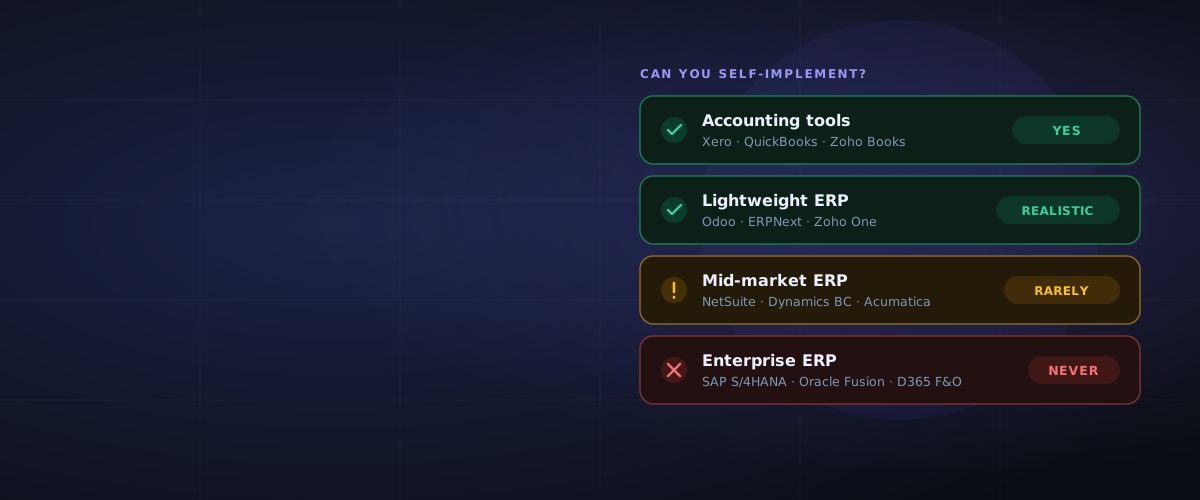
The most expensive mistake QuickBooks graduates make is over-jumping — leaping to an enterprise platform when a lightweight or mid-market ERP fits. Match the move to your actual complexity:
| Your situation | Sensible next step |
|---|---|
| Product/operations growing, want one connected system | Odoo (lightweight, modular) or mid-market |
| Inventory, distribution, multi-location | Acumatica, NetSuite |
| Services / multi-entity finance focus | Sage Intacct, NetSuite |
| Microsoft-centric, broad mid-market needs | Dynamics 365 Business Central |
| Still mostly accounting, just need a better fit | Xero or QuickBooks Online Advanced |
The right answer depends on your industry depth, transaction volume, and growth plans — not on which brand a peer happens to use. That's a fit question, and it's worth working through which ERP is right for my business before you talk to any vendor.
The mistakes businesses make at this crossroads
- Staying too long. The workarounds become the business, and the eventual migration is harder because there's more mess to untangle.
- Over-buying. Jumping to SAP or Oracle when Odoo, Business Central, or NetSuite would fit — paying for complexity you don't need.
- Migrating dirty data. Carrying years of clutter and wrong opening balances into the new system. A move off QuickBooks is the moment to clean house, not copy it across. (See the data migration guide.)
- Buying on brand, not fit. The "best" ERP is the one that matches your operations — start from your processes, not a vendor's demo.
Leaving QuickBooks isn't a failure of QuickBooks. It's a sign your business grew — and the goal now is to move to the right next system, not the biggest one.
Frequently Asked Questions
When should I move from QuickBooks to an ERP?
Move when you need connected operations rather than better accounting — typically when several of these are true at once: inventory has outgrown basic tracking, you're consolidating multiple entities by hand, month-end is a manual export-and-reconcile marathon, reporting can't answer leadership's questions without spreadsheets, and you're patching gaps with a stack of add-ons. One mild gap usually means upgrade within QuickBooks; several structural ones mean it's ERP time.
What is the best ERP to move to after QuickBooks?
There's no single best — it depends on your complexity. Operations-heavy small businesses often land well on Odoo; inventory and distribution businesses on Acumatica or NetSuite; services and multi-entity finance on Sage Intacct or NetSuite; Microsoft-centric businesses on Dynamics 365 Business Central. The key is to avoid over-jumping to enterprise platforms you don't need. A vendor-agnostic assessment matches your profile to the right tier.
Can QuickBooks handle inventory and manufacturing?
QuickBooks offers basic inventory tracking, but not real multi-location stock control, landed costing, valuation flexibility, or manufacturing and bills of materials. If you're managing stock in spreadsheets alongside QuickBooks or running production, you've reached the point where inventory-capable ERP makes sense.
Is QuickBooks Online Advanced enough, or do I need an ERP?
QuickBooks Online Advanced adds more users, deeper reporting, and workflow features, and it can buy real runway if your gap is mild. It does not provide true multi-entity consolidation, manufacturing, dimensional financials, or built-in operational controls. If your pain is structural — inventory, multiple entities, operations sprawl — an ERP is the right move rather than a higher QuickBooks tier.
How hard is it to migrate from QuickBooks to an ERP?
It's a real project, not a button. The biggest factors are data quality, how standard your processes are, and how much you customise. The most common mistake is migrating dirty data and wrong opening balances — treat the move as a chance to clean house. Simple businesses on a lightweight ERP can migrate in weeks; complex multi-entity moves take months.
Does outgrowing QuickBooks mean QuickBooks is bad?
No. QuickBooks is excellent accounting software for small businesses, and outgrowing it is a sign your business grew, not that the tool failed. You cross the line when you need operations connected — inventory, projects, multi-entity, workflows — which is an ERP's job, not an accounting platform's.
Not sure whether you've genuinely outgrown QuickBooks — or which system fits without over-buying? ERPLenz is a free, vendor-agnostic assessment that scores your operational complexity and matches you to the right ERP tier, before any vendor gets your number.